Skip to content

Add-on for the free Takedown Desk plugin

Takedown Desk Pro for busy communities

Takedown Desk Pro adds the tools a team needs once removal requests become part of the week. It finds edited copies of a reported image, covers the community plugins your members post in, pages the person on call, and lets you act on the uploader, prove what you did and see how fast you work.

  • Needs the free Takedown Desk plugin
  • Images and fingerprints stay on your site
  • Every legal duty stays in the free plugin
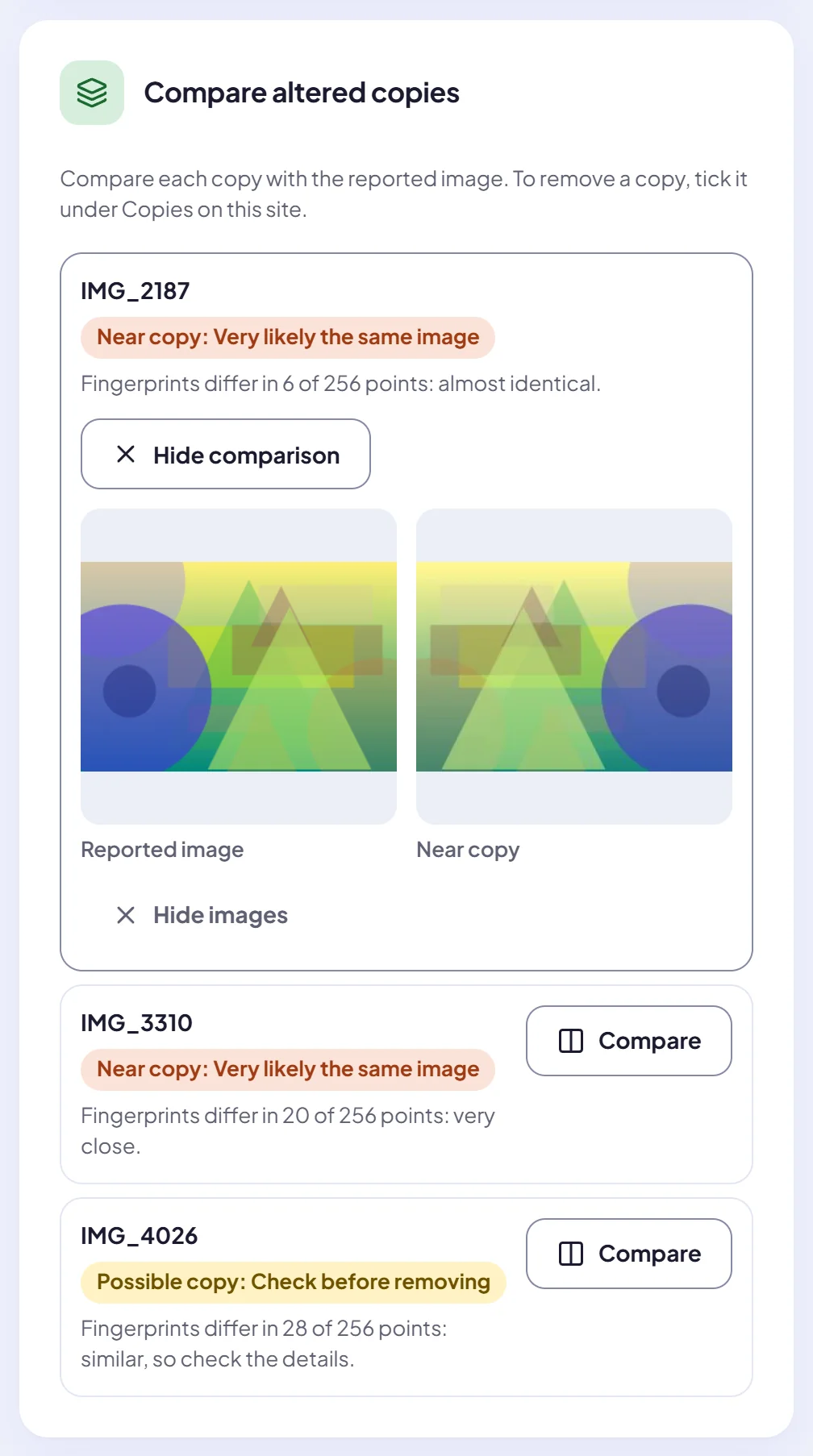
Compare altered copies on a request: a mirrored, recolored copy shown side by side with the reported image, two near copies and one possible copy with how far their fingerprints differ
The Compare panel on a request, on our test site.

Why busy sites add Pro

The free plugin covers every legal duty: the removal request form, the 48-hour clock, the reminders, removal and the record. Pro is for the work around it once a site gets busy.

As your site grows

The free plugin

With Pro

Altered copies

The same photo comes back resized, recolored or mirrored.

Finds exact copies of the reported file and blocks exact re-uploads.

Also finds edited copies, shows each one next to the reported image and blocks altered re-uploads.

Many community plugins

Members post in activity streams, private messages, forums and reviews.

Handles posts and comments.

Also finds, takes offline and puts back content from seven community plugins.

A team on call

Requests arrive at night and on weekends, and more than one person handles them.

Sends reminder emails to your moderators as the deadline gets close.

Pages the person on call in Slack or by text, and adds uploader actions, evidence packets and monthly reports.

Six things Pro adds

Everything sits inside the Takedown Desk screen you already use: the Pro tab, each request, the Reports tab and, on Agency plans, Client sites.

On each request

Altered-copy matching

Finds edited copies of a reported image in your media library, using a perceptual fingerprint (PDQ) of every image, built in the background a batch at a time.

  • Catches copies that were resized, recompressed, saved in another format, recolored, turned gray, mirrored, rotated or lightly cropped
  • “Near copy” and “Possible copy” labels, with a side-by-side comparison before anything is removed
  • Strict, Balanced (recommended) or Wide sensitivity
  • Once an image is removed, altered copies of it can no longer be uploaded

Pro tab

Community plugin integrations

Finds, takes offline and puts back content from community plugins the same way the free plugin handles posts and comments.

  • BuddyPress, BuddyBoss Platform, PeepSo and Better Messages
  • Ultimate Member, wpForo and WooCommerce product reviews
  • Switch each one off, and choose where the “Request removal” link appears
  • Private messages can only be reported by the people in the conversation

Uploader card

Uploader actions

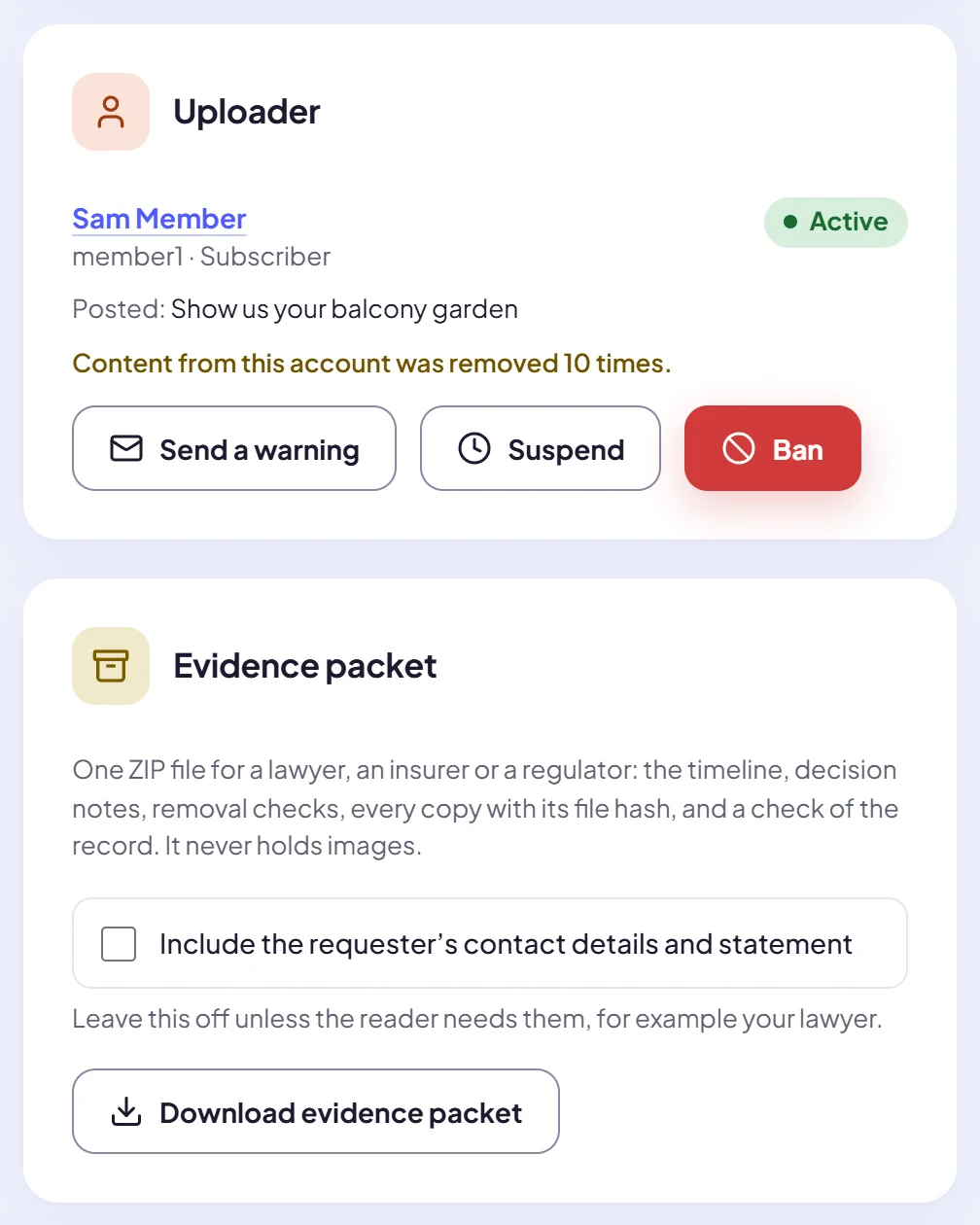
Act on the account that posted reported content, right from the request. Every action is written to the request's record.

  • A warning email that never names or describes the person who made the request
  • Suspend for 1 to 365 days, or ban, optionally hiding their other posts and comments
  • Lift a suspension or a ban, which puts back what the ban hid
  • Administrators and moderators are never affected

Pro tab

Escalation

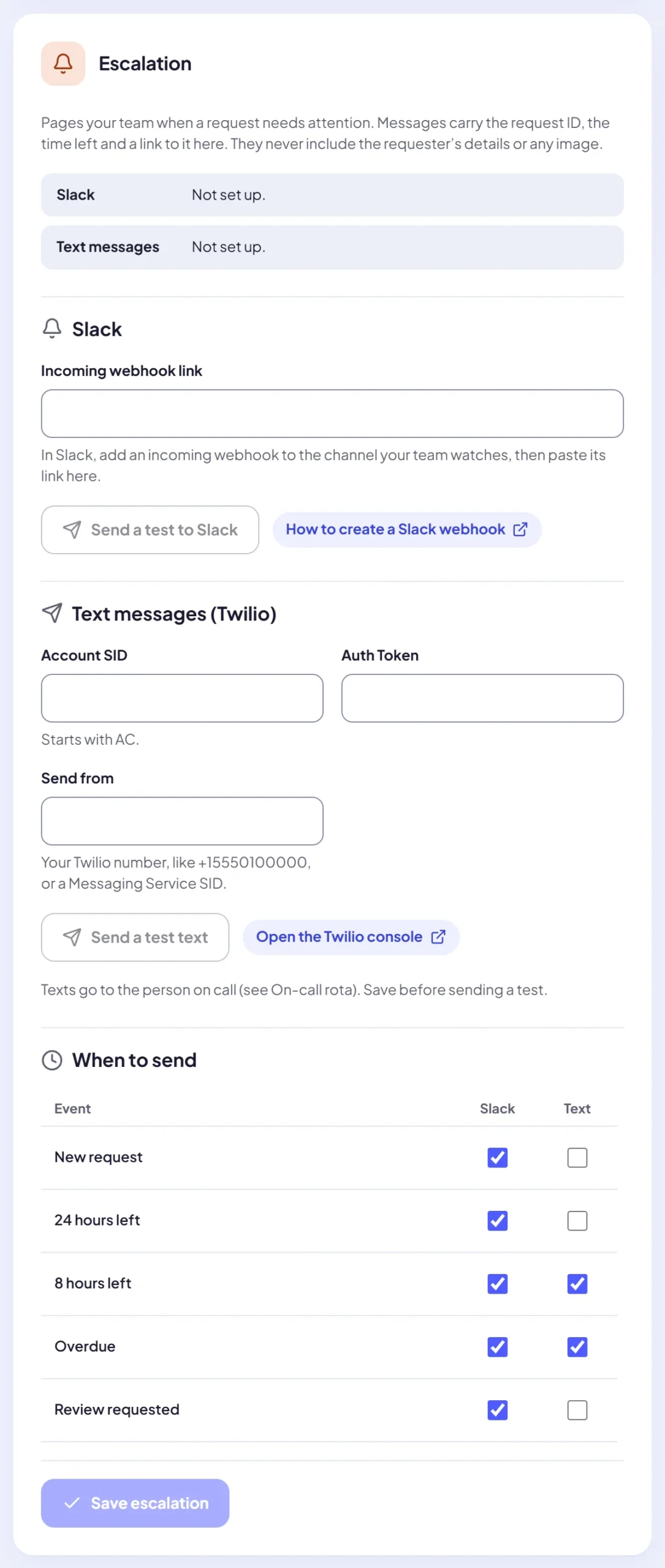
Pages your team in Slack and by text message (Twilio) when a request needs attention.

  • Rules for a new request, 24 hours left, 8 hours left, overdue and review requested
  • A weekly on-call rota with day and night shifts, plus a fallback person
  • “Send a test” buttons and the last result of each channel
  • Messages hold the request ID, the time left and a link. Never the requester's details or any image

Evidence packet card

Evidence packets

One ZIP file per request for a lawyer, an insurer or a regulator. Each download is written to the record.

  • A printable summary with the timeline, decision notes, removal checks and every copy with its file hash
  • The record as a CSV file with each row's hash, and a guide to checking them
  • Never holds images
  • The requester's contact details and statement only when you tick the box

Reports and Client sites

Reports and agency tools

The numbers for any month beside the month before, and one list of every site you look after.

  • Requests, time to removal, items removed, re-uploads blocked and uploader actions
  • Plain-English notes, a CSV download, a print layout and a monthly email
  • Agency plans: All sites in Network Admin for multisite, and a Client sites tab for separate sites
  • Only the request ID, status, deadline and item name are shared between sites

Pro screens on a test site

Taken on our own test site with example content. Select a screen to open it full size.

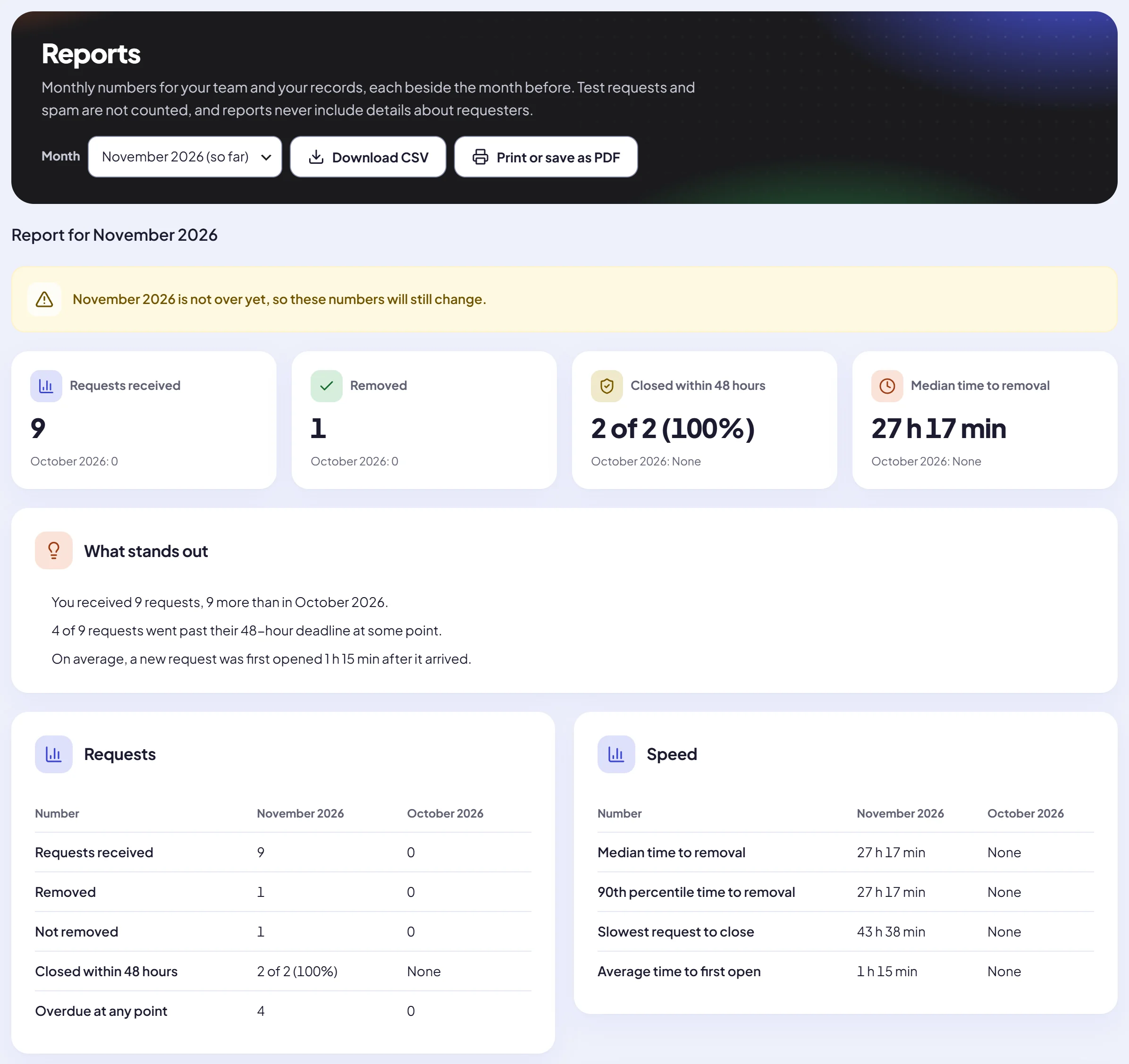
Reports tab for a month on a test site: requests received, removed, closed within 48 hours and median time to removal, plain-English notes, and the Requests and Speed tables beside the month before
Reports. Each number beside the month before, with notes in plain English.
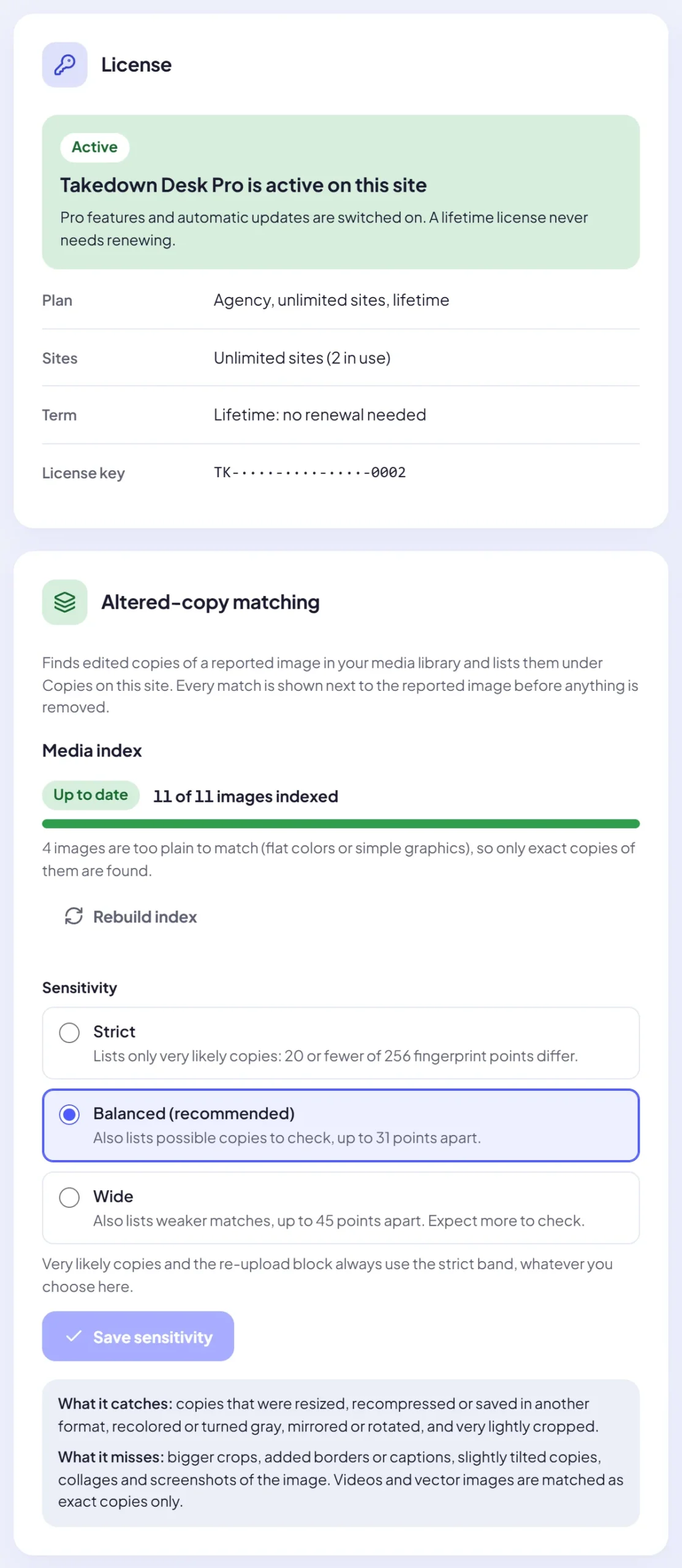
Takedown Desk Pro tab: the License card showing an active Agency lifetime license, and the Altered-copy matching card with the media index, sensitivity levels and what matching catches and misses
License and matching. The license, the media index and the sensitivity.
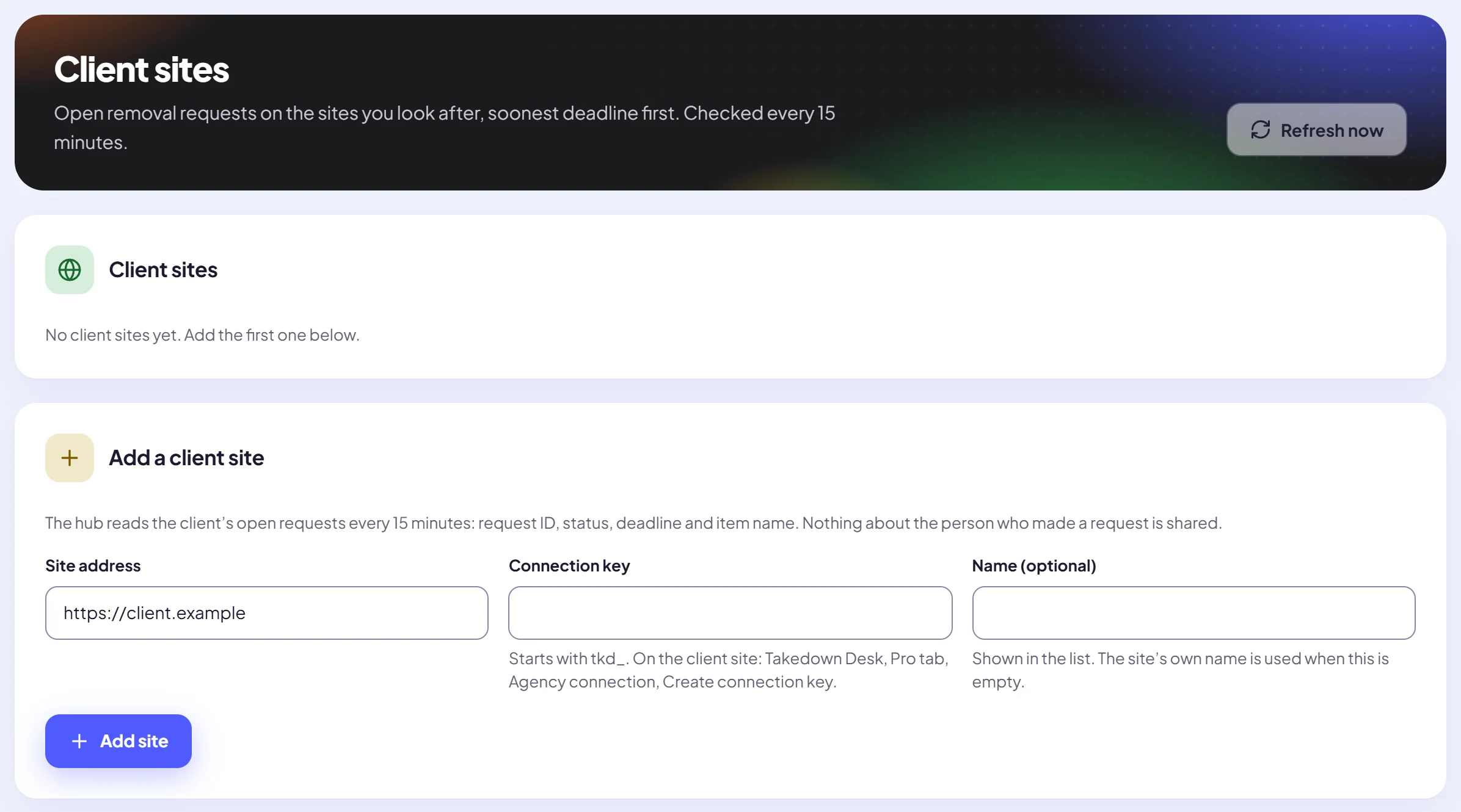
Client sites tab: Refresh now, the empty client list, and the Add a client site form with a site address, connection key and optional name
Client sites. Add a client with its address and connection key (Agency plans).
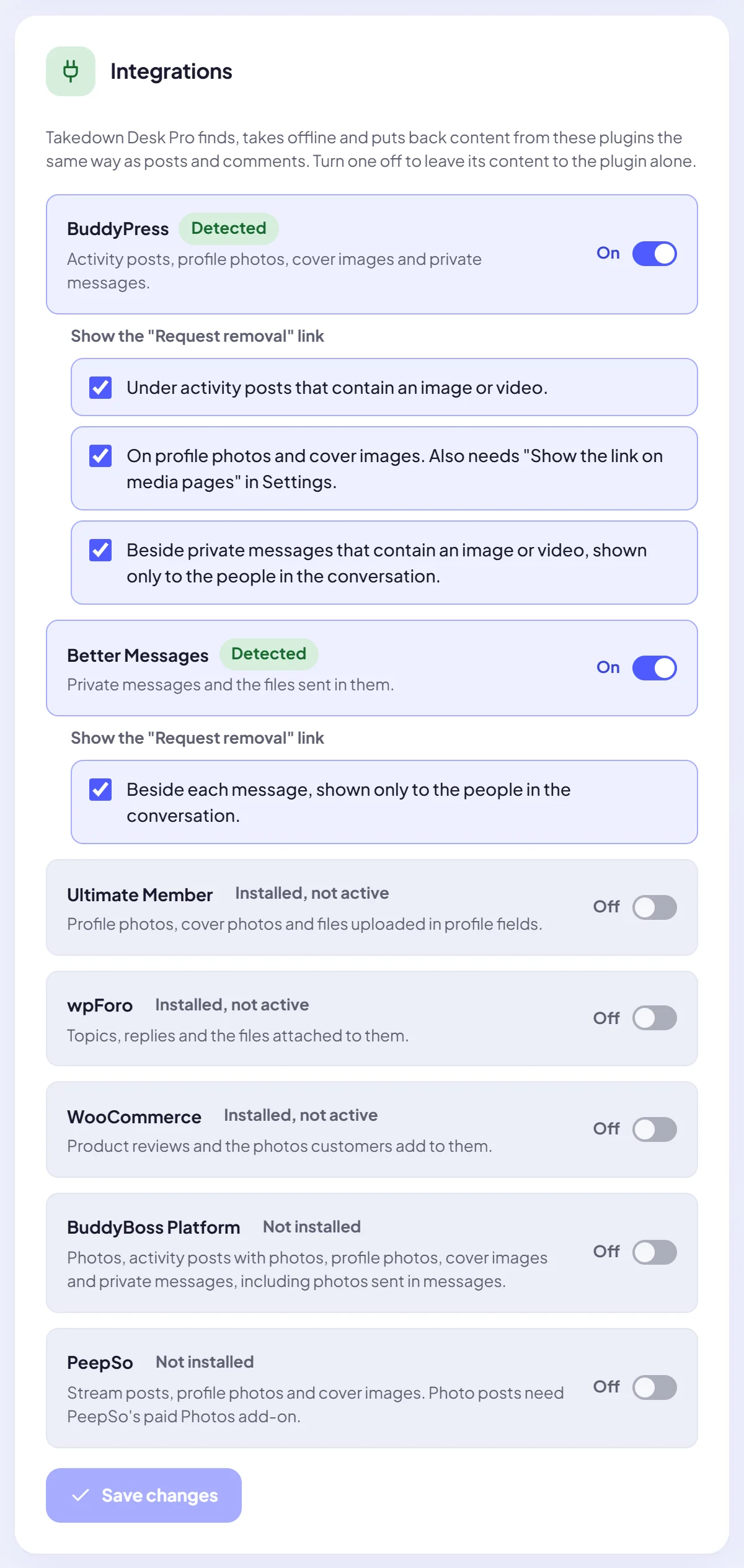
Integrations card: BuddyPress and Better Messages detected and switched on with their Request removal link places, and Ultimate Member, wpForo, WooCommerce, BuddyBoss Platform and PeepSo switched off
Integrations. Detected plugins, on or off, and where the link shows.
Uploader card on a request with Send a warning, Suspend and Ban for the member who posted the item, and the Evidence packet card with Download evidence packet
Uploader and evidence. Warn, suspend or ban, then download the packet.
Escalation card: empty Slack webhook and Twilio fields with Send a test buttons, and the When to send table with a Slack and a text switch for each event
Escalation. Slack, text messages and when to send each.

Takedown Desk Pro pricing

Every plan has every Pro feature. Plans differ in how many sites they cover, and Agency adds the agency tools.

Launch price on your first payment for the first 100 customers.

Personal

Regular price $50 Launch price $25 first year

Then $50 per year. Cancel any time.

1 site

  • Altered-copy matching (resized, recompressed, mirrored)
  • Re-upload block for altered copies
  • BuddyPress, BuddyBoss, Ultimate Member, wpForo, PeepSo and WooCommerce reviews
  • Slack and SMS escalation with an on-call rota
  • Evidence packet and monthly report
  • Email support for the plugin

LIMITED TIME ONLY

Agency lifetime

Regular price $599 Launch price $300 one-time

Pay once. Updates for life, no renewal.

Unlimited sites

  • Multisite and client-sites dashboard
  • Altered-copy matching (resized, recompressed, mirrored)
  • Re-upload block for altered copies
  • BuddyPress, BuddyBoss, Ultimate Member, wpForo, PeepSo and WooCommerce reviews
  • Slack and SMS escalation with an on-call rota
  • Evidence packet and monthly report
  • Email support for the plugin

Prices in USD. Tax is added at checkout where it applies.

  • Personal covers one site, billed yearly.
  • Business covers five sites, billed yearly.
  • Agency covers unlimited sites and adds the agency tools. While the limited-time deal runs, it is a one-time payment for a lifetime license.
  • The launch price is for the first year only. Renewals are at the regular price.
  • Lifetime licenses keep working forever, with updates for life.
  • Every legal duty stays in the free plugin, which keeps working with or without Pro.

Prices in USD. Tax is added at checkout where it applies.

How licensing works

Takedown Desk Pro is an add-on. It needs the free Takedown Desk plugin, which keeps working on its own whether or not you buy Pro.

  1. 1

    Install the free plugin

    Install and activate Takedown Desk, and finish its setup.

  2. 2

    Upload Takedown Desk Pro

    After checkout, get the Pro ZIP file and your key from your account page. Upload the ZIP in Plugins > Add New > Upload Plugin and activate it.

  3. 3

    Paste your TK- key

    Open Takedown Desk > Pro, paste your license key (it starts with TK-) and select Activate license.

  4. 4

    Review the Pro cards

    On the same tab: Altered-copy matching, Integrations, Escalation, On-call rota, Uploader actions and Monthly report.

What the License card can say

Active
Pro features and automatic updates are on. Updates are signed and checked before they install.
Ends soon
The subscription was canceled. Pro keeps working until the end date. Renew before then to keep it.
Expired or No longer valid
Pro features and updates pause. Your data is safe. Renew, and Pro switches back on by itself.

If the license ends, your requests, your record and every free feature keep working, and nothing Pro saved is deleted. Suspensions and bans already in place stay in force. To move Pro to another site, select Deactivate on this site on the Pro tab.

BuddyPress, BuddyBoss and wpForo moderation: community plugins Pro works with

Pro finds, takes offline and puts back content from these plugins. Each one can be switched off, and you choose where the “Request removal” link appears.

  • Tested
  • Not tested yet

BuddyPress

  • Activity posts
  • Profile photos
  • Cover images
  • Private messages

BuddyBoss Platform

  • Photos
  • Activity posts with photos
  • Profile photos
  • Cover images
  • Private messages, including photos sent in them
  • Documents from BuddyBoss's paid add-ons: not tested yet
  • Videos from BuddyBoss's paid add-ons: not tested yet

PeepSo

  • Stream posts
  • Profile photos
  • Cover images
  • Photo posts (need PeepSo's paid Photos add-on): not tested yet

Better Messages

  • Private messages
  • Files sent in messages

Ultimate Member

  • Profile photos
  • Cover photos
  • Files uploaded in profile fields

wpForo

  • Topics
  • Replies
  • Files attached to them

WooCommerce

  • Product reviews
  • Photos and videos customers add with Photo Reviews for WooCommerce
  • Photos and videos customers add with Customer Reviews for WooCommerce

Private messages can only be reported by the people in the conversation, and the link shows only to them. WooCommerce reviews also need “Show the link under comments” in Takedown Desk > Settings.

What Pro does not do, and where your data goes

Pro does not

  • Take over your legal duties. The free plugin handles them: the request form, the 48-hour clock, the reminders, removal and the record.
  • Fetch reported links. Matching only compares images already in your media library.
  • Catch every edit. Bigger crops, added borders or captions, tilted copies, collages and screenshots can be missed. Videos and vector images are matched as exact copies only.
  • Touch staff accounts. Uploader actions never affect administrators or moderators.
  • Tell an uploader who asked. Warnings, escalation messages, reports and the evidence packet leave out the requester's name, contact details and statement, unless you tick the box on the packet.

Images, fingerprints and requester details never leave your site.

Fingerprints are made and compared on your own server. Pro only talks to these services:

Swift Web Dev license server
When you activate or deactivate, once a day while active, and on update checks. At activation it gets your license key, site address and WordPress and plugin versions. No request, requester or content data.
Slack, only if you connect it
When a rule you switched on fires, or you send a test: your site name, the request ID, the time left, the deadline and a link to the request in your admin.
Twilio, only if you connect it
The same rules, sent as a short text to the person on call: your site name, the request ID, the time left and a link to the request.
Your client sites, only if you add one
Agency plans: every 15 minutes the hub reads each client's open requests: request ID, status, deadline and item name.

Nothing is sent to Slack or Twilio while your license is not active. Your Slack webhook link and Twilio Auth Token are stored encrypted and are never shown again after you save them.

Questions about Takedown Desk Pro

Something not covered here? Start a discussion

Do I need the free plugin?

Yes. Takedown Desk Pro is an add-on. It does nothing on its own and asks you to install Takedown Desk when it is missing.

Which plan do I need?

Personal covers one site and Business covers five sites. Agency covers unlimited sites and adds the All sites screen for multisite networks and the Client sites tab. A client site needs its own active Takedown Desk Pro license, on any plan.

Does the launch price renew?

No. The launch price is for the first year only. Yearly plans renew at the regular price.

Does a lifetime license expire?

No. A lifetime license is a one-time payment and keeps working forever, with updates for life. The lifetime Agency plan is sold only while the limited-time deal runs.

What happens when my license ends?

Pro features stop: no new matching, no escalation messages, no new uploader actions, no monthly email. Your requests, your record and every free feature keep working, suspensions and bans already in place stay in force, and past monthly numbers stay readable on the Reports tab. Activate a license again and Pro picks up where it stopped.

Does matching send my images anywhere?

No. Fingerprints are made and compared on your own server. Takedown Desk Pro never fetches a reported link and never sends an image or a fingerprint off your site.

Will matching slow my site down?

The index is built in the background, a small batch at a time, through Action Scheduler. You can pause it from the Pro tab. New uploads are fingerprinted shortly after they arrive.

Can an uploader be told who made the request?

No. The warning email, escalation messages, reports and the evidence packet (unless you tick the contact box) never include the requester’s name, contact details or statement.

Where does the monthly report go?

To the same people who get the free plugin’s new-request emails: moderators and any extra addresses in Takedown Desk > Settings.

How do I move my license to another site?

Open Takedown Desk > Pro and select Deactivate on this site. The slot is freed and your data stays on this site.

Who handles the payment?

Creem is our merchant of record. Prices are in USD, and tax is added at checkout where it applies.

Give your team a desk that keeps up

Pick a plan, paste your TK- key on the Pro tab, and the media index starts building in the background.