Jetpack Stats alternative
A Jetpack Stats alternative that needs no WordPress.com account
Jetpack Stats collects nothing until your site is connected to a WordPress.com account, and every page view is sent to WordPress.com. SwiftWebDev Dashboard is a free Jetpack Stats alternative that counts visitors on your own server and keeps the numbers in your own WordPress database. No account to connect, no cookies, and IP addresses are never saved.
To be fair: Jetpack keeps your full history and has subscriber and download stats. This page shows both sides.
- No WordPress.com account
- Stored in your own database
- No cookies, no saved IP
Why people look for a Jetpack Stats alternative
The reasons I hear most come down to three things. Here is each one, and what changes when your site counts its own visitors.
No outside account
Jetpack Stats needs a connection to a WordPress.com account. Until that connection is made, it collects no data.
With SwiftWebDev Dashboard Install and activate, and counting starts. There is no account, license key or API key.
Data in your own database
Jetpack Stats sends each page view to WordPress.com with the visitor’s IP address and browser details. Automattic keeps those stats logs for 28 days.
With SwiftWebDev Dashboard Visits are counted on your own server and stored in your own WordPress database. Nothing is sent to anyone else.
No cookies, no saved IP
Jetpack Stats tracks visitors who have Do Not Track switched on, unless you add a setting that tells it not to.
With SwiftWebDev Dashboard Nothing is stored in the browser. A visit is a one-way hash of the IP address and browser plus a random value that changes every day, and the IP address is never saved.
Also on the same dashboard, free
- Top pages, referrers and devices
- AI visitors and AI crawlers
- PageSpeed scores for any page
- A views column on Posts and Pages
- A weekly email every Monday
- Pending updates and Site Health
Read how to see ChatGPT and AI traffic in WordPress or check your PageSpeed score in WordPress.
What Jetpack Stats still does better
I build SwiftWebDev Dashboard, so this is the part a plugin page usually skips. If any of these matter to you, keep Jetpack.
Jetpack facts on this page come from its WordPress.org plugin page and the Jetpack support docs, checked November 15, 2026.
Full history
Jetpack keeps your whole stats history. SwiftWebDev Dashboard shows the last 7, 30 or 90 days and keeps daily totals for 180 days.
Subscriber stats
Jetpack shows your WordPress and email subscribers. SwiftWebDev Dashboard has no subscriber stats.
Clicks, downloads and video plays
Jetpack measures link clicks, file downloads and video plays. The free SwiftWebDev Dashboard does not. Click and form tracking are in the PRO add-on.
WooCommerce numbers
Jetpack shows orders, refunds and product trends for WooCommerce stores. SwiftWebDev Dashboard does not report sales.
No import
SwiftWebDev Dashboard cannot bring your Jetpack history across. It starts counting on the day you activate it, so note the totals you want to keep before you switch.
Where your visitor data lives, and for how long
Everything SwiftWebDev Dashboard counts stays in your WordPress database. This is what it keeps, and when it is deleted.
Never saved
IP addresses and browser details. They are only used to make the daily one-way hash.
48 hours
Raw visit records. After that they are deleted and only the totals stay.
90 days
Daily counts per page, referring website and device type.
180 days
Daily totals, and daily counts per AI assistant and per AI bot.
Jetpack Stats, for comparison: each page view goes to WordPress.com with the visitor’s IP address, browser details and your site ID, and Automattic keeps those logs for 28 days. Your reports live on WordPress.com, not in your database.
Logged-in users are not counted by default, so your own visits do not inflate the numbers.
Should you switch from Jetpack Stats?
Read each line and keep the ones that sound like you. The label next to it says which way that line points.
- You would rather not connect a WordPress.com account to your site. Switch
- You want visitor counts stored in your own database. Switch
- You want speed scores, updates and AI traffic next to your visitor stats. Switch
- You want a weekly traffic email without paying for a plan. Switch
- You often look back at stats from years ago. Stay with Jetpack
- You grow a newsletter with Jetpack and watch your subscriber numbers. Stay with Jetpack
- You need click, download or video play stats without paying for an add-on. Stay with Jetpack
- You are not sure yet. Run both for a month
How to switch from Jetpack Stats, step by step
The whole move takes a few minutes of work. The waiting part is running both plugins side by side until you trust the new numbers.
Download free on WordPress.org- 1
Write down what you want to keep
Your Jetpack history does not move across. Note the totals you care about, such as last year’s visitors or your top posts.
- 2
Install SwiftWebDev Dashboard
In WordPress, go to Plugins, then Add New, search for SwiftWebDev Dashboard, and install and activate it. Then open SwiftWebDev in the admin menu.
- 3
Run both for a few weeks
Each plugin counts on its own. Expect different totals: they count visits in different ways, and SwiftWebDev Dashboard skips logged-in users by default. Compare the trends, not the exact numbers.
- 4
Turn on the weekly email
Optional. In the plugin settings, switch on the Weekly Site Report and send yourself a test. After that it arrives every Monday.
- 5
Switch off Jetpack Stats
When you no longer need it, turn off the Stats feature in Jetpack, or deactivate Jetpack if you only used it for stats.
Watch: visitor stats with no account to connect
A short tutorial on the visitor cards in SwiftWebDev Dashboard, how a visit is counted without cookies, and what is kept in your own WordPress database.
Read the transcript
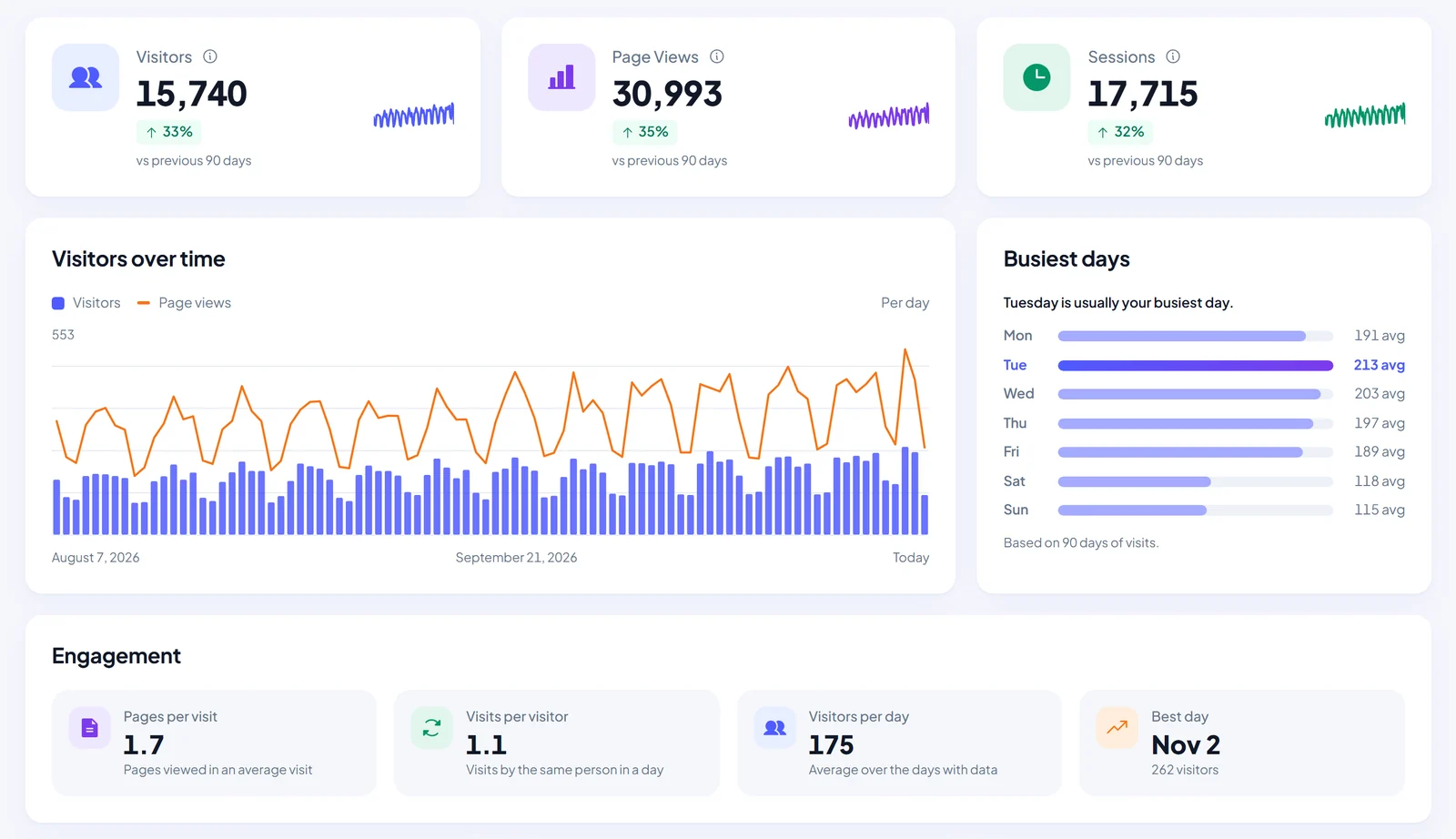
Real visitor stats. No cookies, no Google account. Open SwiftWebDev in the admin menu. Your visitor stats are on the dashboard, in six cards. You do not need a Google Analytics account, and no cookies are used. The top three cards are Visitors, Page Views, and Sessions. Visitors are the unique people who came to your site. Page views count every page they opened. Sessions are separate visits, so one person can have several.
Use the period picker at the top to choose the last seven, thirty, or ninety days. Thirty is the default. Each card compares the total with the period just before it. Green means it went up, red means it went down, and the sparkline shows the daily trend. Visitors over time shows a bar for each day, with page views as a line. Hover a bar to see the numbers for that day. Busiest days shows the average visitors for each day of the week, and names your busiest day.
Engagement adds four numbers: pages per visit, visits per visitor, average visitors per day, and your best day in the period. How is a visit counted? After a page loads, one small script sends a single request to your own site. Bots, link previews, and prefetched pages are skipped. Logged-in users are not counted by default, so your own visits do not inflate the numbers. You can change this in SwiftWebDev Dashboard settings, in your user menu.
There are no cookies and no browser storage. Your server turns the IP address and browser into a one-way code, mixed with a random value that changes every day. The IP address, browser details, and page addresses are never saved. A new session starts after thirty minutes without a page view. Because the code changes daily, a person who visits on two different days is counted once on each day.
Raw visit records are deleted after forty-eight hours. Only daily totals are kept, for one hundred and eighty days, enough to compare ninety days with the ninety before. Everything stays in your own WordPress database. For deeper reports, like real-time visitors, traffic sources, and top pages, there is the separate SwiftWebDev Dashboard PRO add-on. The free stats work fully on their own.
That is cookieless visitor stats in SwiftWebDev Dashboard. Next: Google PageSpeed scores for any page of your site. Subscribe for more SwiftWebDev Dashboard tutorials.
Jetpack Stats alternative: questions before you switch
Every setting and every number is explained in the docs.
SwiftWebDev Dashboard docs
Is there a free Jetpack Stats alternative without a WordPress.com account?
Yes. SwiftWebDev Dashboard is free on WordPress.org and needs no account of any kind. It counts visitors, page views and sessions, shows top pages, referrers and devices, and keeps everything in your own WordPress database.
Does Jetpack Stats need a WordPress.com account?
Yes. The Jetpack Stats plugin page says it requires a connection to a WordPress.com account, and that no data is collected and no reports are available until that connection is complete.
Can I import my Jetpack Stats history?
No. SwiftWebDev Dashboard starts counting on the day you activate it. Keep Jetpack running until you no longer need its history, and note the totals you want to keep first.
Why are my numbers different from Jetpack Stats?
The two plugins count in different ways. SwiftWebDev Dashboard counts a visit with a small script after the page loads, groups visits with a daily hash instead of a cookie, and skips logged-in users by default. Small gaps are normal, so compare trends, not exact totals.
Does SwiftWebDev Dashboard use cookies or save IP addresses?
It sets no cookies, uses no browser storage and never saves IP addresses. Whether your site needs a cookie banner depends on the other tools you run and where your visitors live, so treat this as a description of the plugin, not legal advice.
Can it show traffic from ChatGPT and other AI assistants?
Yes. The AI visitors card counts people who clicked a link to your site in ChatGPT, Perplexity, Gemini, Claude, Copilot and more. Some of those visits arrive as Direct, so treat the number as a minimum. More in how to see ChatGPT and AI traffic in WordPress.
Will it slow my site down?
The front end gets one small counter script that runs after the page has loaded, and everything else runs in the admin area. To measure your own site, read how to check your PageSpeed score in WordPress.
Do I need SwiftWebDev Dashboard PRO?
No. The free plugin works on its own with no limits. PRO is a separate add-on for real-time visitors, countries, goals, UTM campaigns, click and form tracking, session recordings and CSV export. See what SwiftWebDev Dashboard PRO adds.
Start counting in your own database today
Free on WordPress.org. No account, no cookies, and your classic WordPress dashboard stays one click away.
Download free on WordPress.org