Skip to content

SourceSay ProPRO

See where the revenue WooCommerce calls Direct really came from

SourceSay Pro is the add-on for the free SourceSay WooCommerce plugin. It puts what your customers said next to what WooCommerce tracked, follows each channel's repeat customers, asks follow-up questions after checkout and sends every answer to GA4, Meta, Klaviyo or FluentCRM.

  • Unlimited responses on every plan
  • Answers stay in your store
  • 14-day refund

The blind spot report

WooCommerce tracks the last click. Your customers remember the reason.

WooCommerce Order Attribution records where each visit came from. When someone hears about you on a podcast and types your address later, it says Direct. The free SourceSay plugin already saves both views on every order. Pro lines them up so you can see which channels the tracking misses.

  1. 1

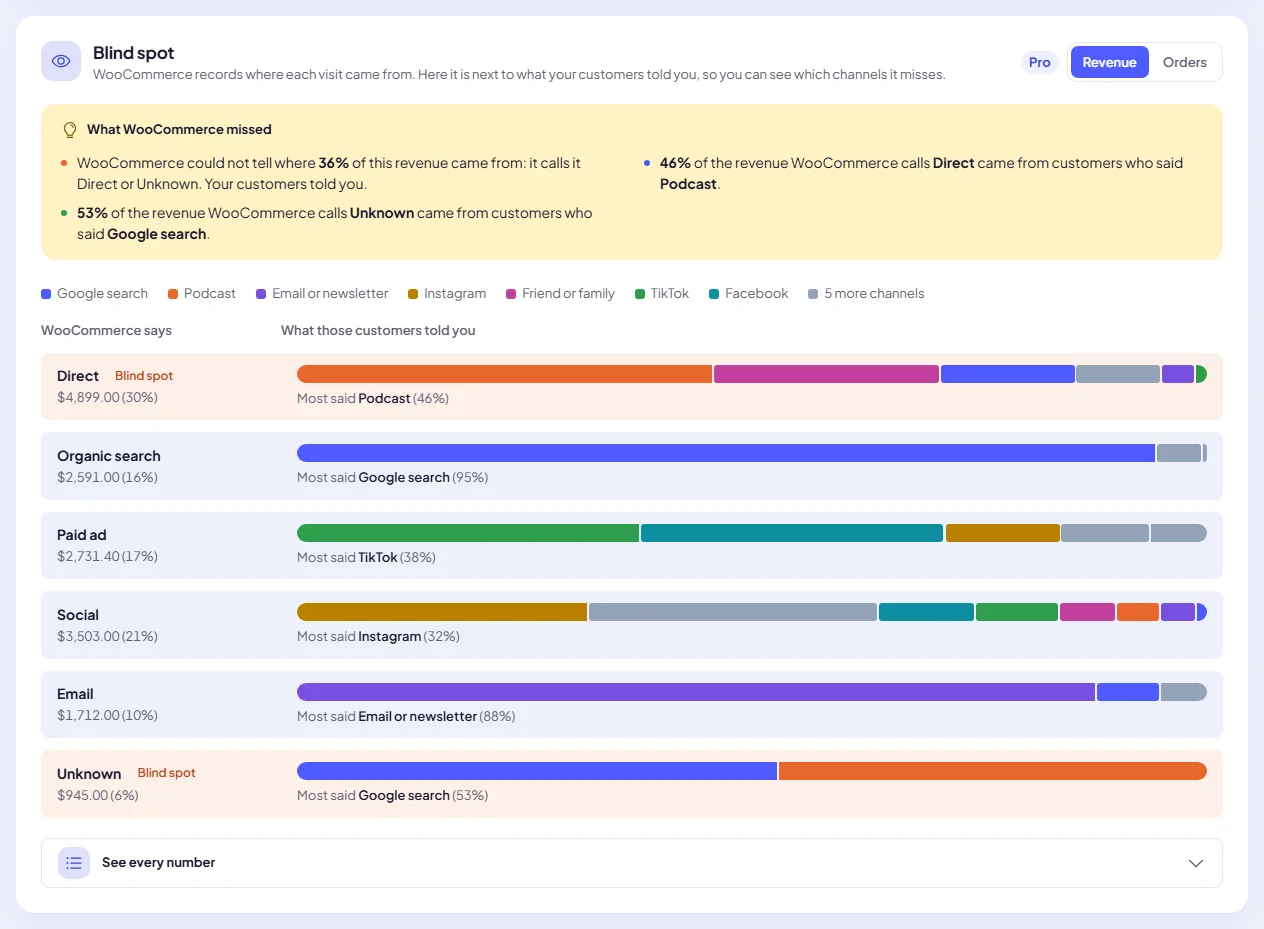
    WooCommerce says. Each tracked source in plain words: Direct, Organic search, Paid ad, Referral, Social, Email or Unknown, with its revenue.

  2. 2

    What those customers told you. The same orders split by the answer each customer gave, with the answer most of them picked.

  3. 3

    What WooCommerce missed. Short findings in plain English, plus a table with every number behind the chart.

A finding from our demo store“50% of the revenue WooCommerce calls Direct came from customers who said Podcast.”

SourceSay Pro Blind spot report: each WooCommerce source such as Direct and Unknown split into what customers said, with findings about the revenue WooCommerce missed
The Blind spot card on the Reports tab, on a demo store. Switch between revenue and orders.

Four things Pro adds to SourceSay

Everything sits inside the screen you already know: WooCommerce, SourceSay. Pro adds cards to the Survey, Reports and Settings tabs, plus a License tab and an Integrations tab.

Survey tab

Follow-up questions

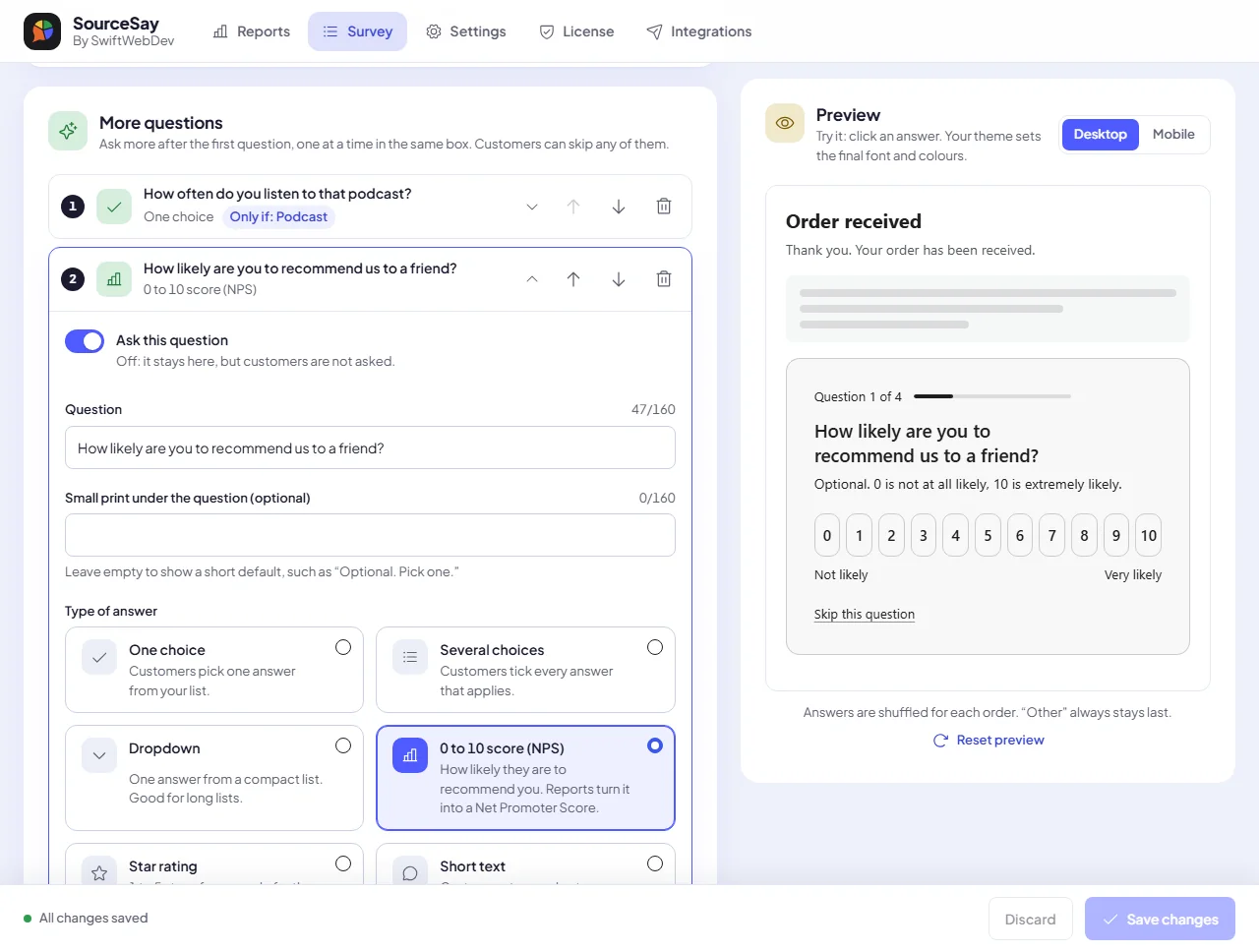
Ask up to 10 more questions after “How did you hear about us?”, one at a time in the same box. Customers can skip any of them.

  • Six answer types: one choice, several choices, dropdown, 0 to 10 score (NPS), star rating and short text
  • Only ask when an earlier answer matches, for example “How often do you listen?” after Podcast
  • Who sees it: first-time or returning customers, product categories and order total
  • Ready-made questions to start from and a live preview

Reports tab

Revenue reports

Three Pro cards under your free report, for the same date range, each with plain-English findings and an accessible table.

  • Blind spot: what customers said next to what WooCommerce recorded
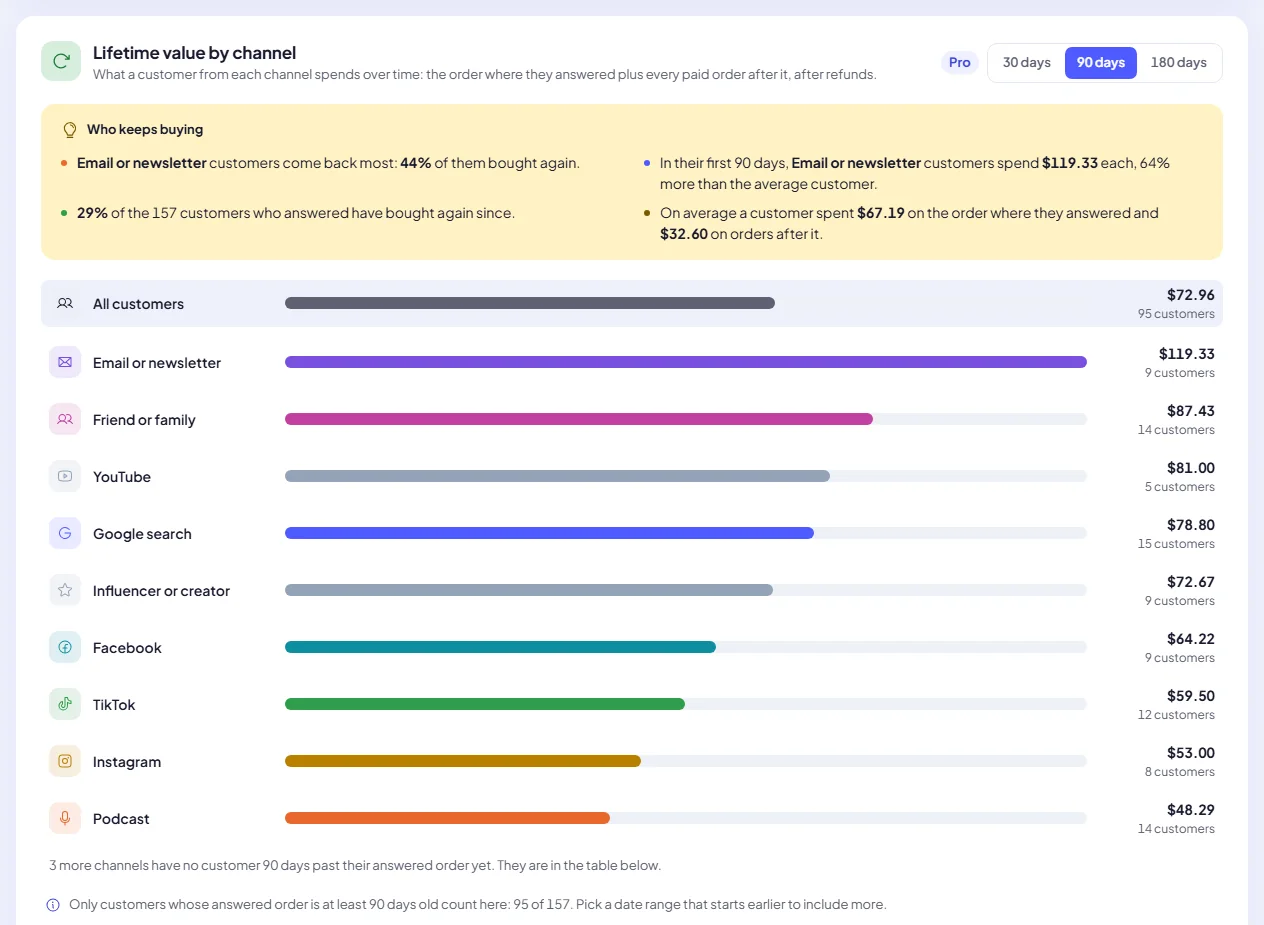
  • Lifetime value by channel: who bought again, and revenue per customer after 30, 90, 180 and 365 days
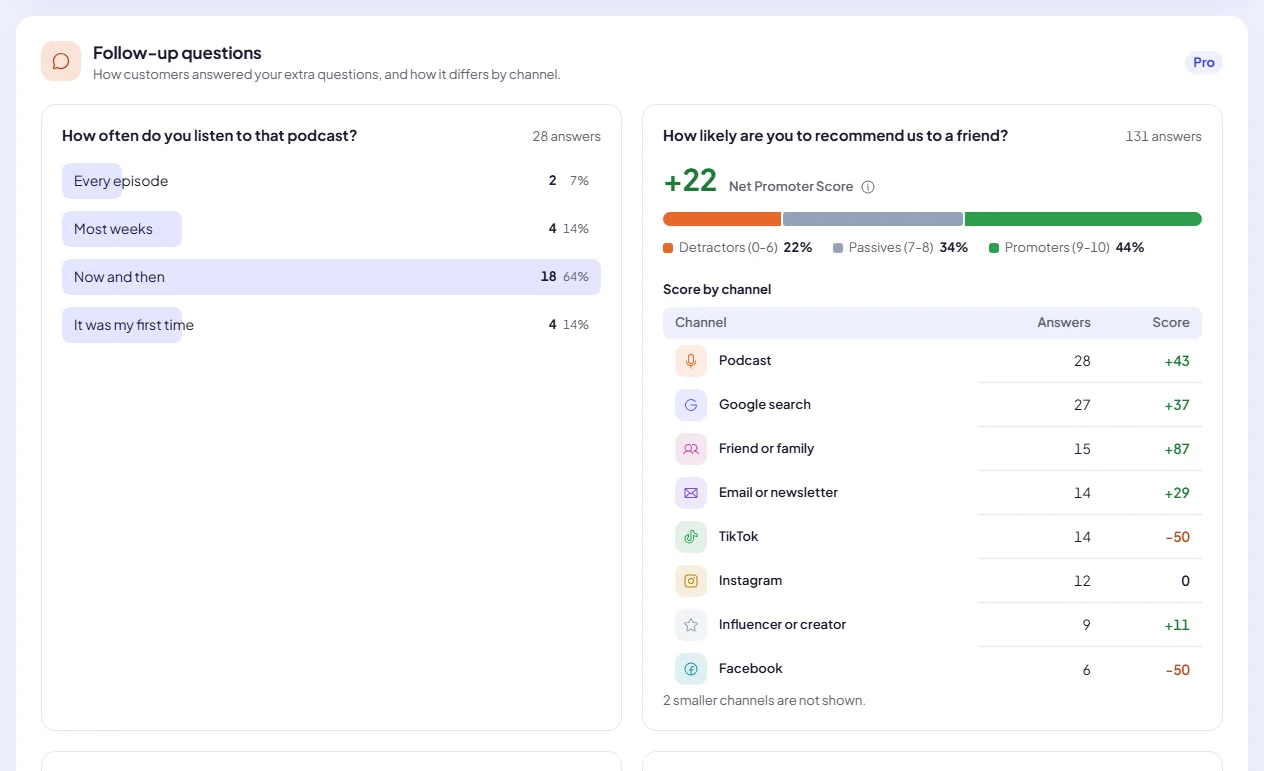
  • Follow-up questions: answer shares, Net Promoter Score and star ratings, split by channel

Integrations tab

Integrations

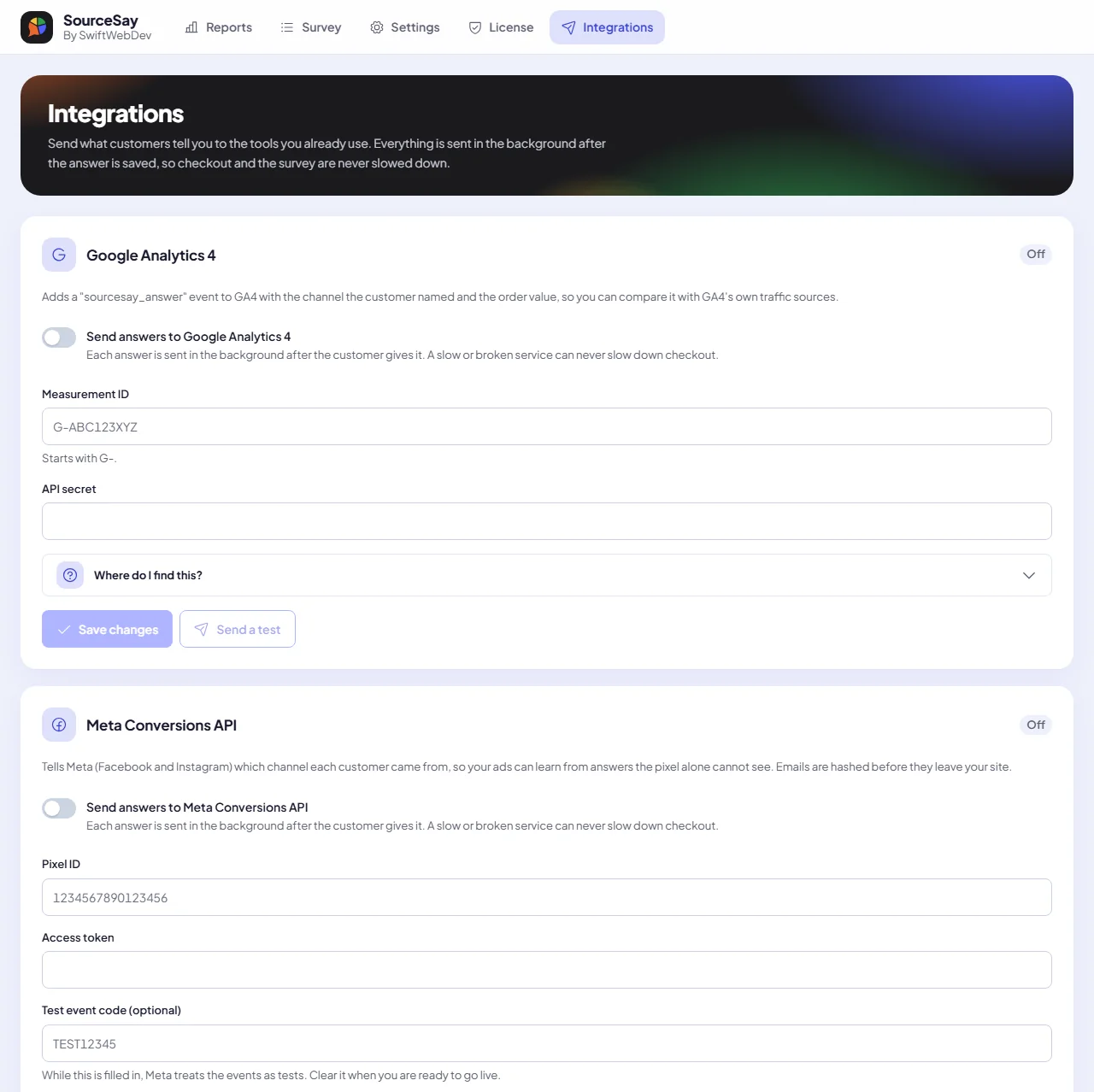
Send what customers tell you to the tools you already use. Each answer goes out in the background after it is saved, so checkout is never slowed down.

  • Google Analytics 4: a sourcesay_answer event with the channel and order value
  • Meta Conversions API: the channel for your ads, with the email hashed before it leaves your site
  • Klaviyo: heard_via properties on the customer's profile, ready for segments
  • FluentCRM: a “Heard via” tag on the contact, on your own site
  • A Test button, the last send status and up to 3 retries

Settings tab

For agencies

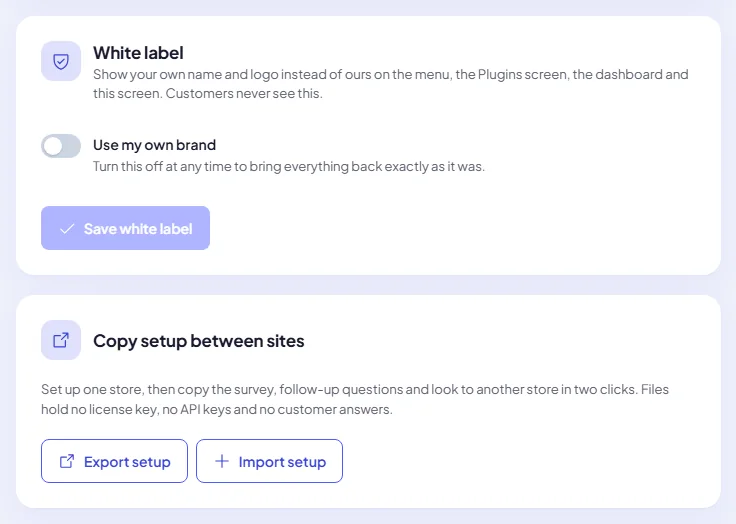
Run SourceSay for clients under your own name, and set up a new store in two clicks.

  • White label: your brand name and logo on the menu, the Plugins screen, the dashboard widget and the SourceSay screen
  • Hide the plugin author name and links, and hide the License tab from other shop managers
  • Copy setup: export the survey, follow-up questions and look as a file, then import it on another store
  • Setup files hold no license key, no API keys and no customer answers

Pro screens on a demo store

Scroll sideways to see more. Select a screen to open it full size.

Lifetime value by channel: average revenue per customer after 90 days for each channel, with who keeps buying
Lifetime value by channel. Which channels bring customers who come back.
Follow-up questions report with answer shares and a Net Promoter Score split by channel
Follow-up questions report. Answer shares and Net Promoter Score by channel.
More questions card on the Survey tab: a 0 to 10 score question being edited, a question asked only if the customer said Podcast, and a live preview
More questions. Write a question, pick when to ask it and watch the preview.
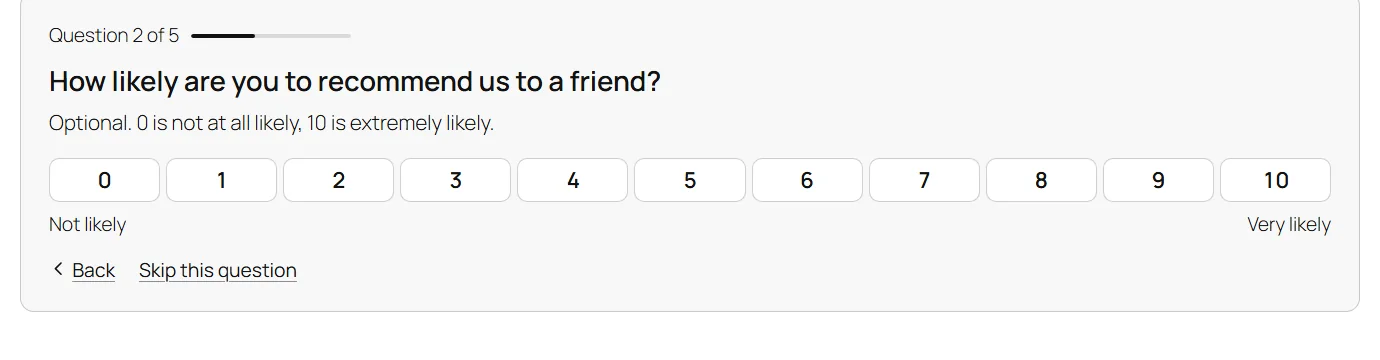
A follow-up question on the WooCommerce order confirmation page: How likely are you to recommend us to a friend, with a 0 to 10 scale, Back and Skip this question
What customers see. One question at a time, in the same box, in your theme's style.
SourceSay Pro Integrations tab with Google Analytics 4 and Meta Conversions API cards, each with its keys, Where do I find this, Save changes and Send a test
Integrations. Paste your keys, follow the steps under Where do I find this, then send a test.
White label card with Use my own brand, and the Copy setup between sites card with Export setup and Import setup
White label and copy setup. Your brand on the admin screens, and one file to set up the next store.

SourceSay Pro pricing

Every plan has every Pro feature and unlimited survey responses. Plans differ only in how many stores you can use them on.

Launch price for the first 100 customers.

Personal

Regular price $49 Launch price $25 per year

Your price stays the same as long as you renew.

+ VAT or sales tax where applicable

1 store

  • Unlimited survey responses
  • Follow-up questions with branching
  • Revenue and lifetime value by channel
  • What customers said vs what was tracked
  • Exports and integrations
  • Email support for the plugin

Agency

Regular price $299 Launch price $199 per year

Your price stays the same as long as you renew.

+ VAT or sales tax where applicable

25 stores

  • Unlimited survey responses
  • Follow-up questions with branching
  • Revenue and lifetime value by channel
  • What customers said vs what was tracked
  • Exports and integrations
  • Email support for the plugin
  • The launch price is for the first 100 purchases. The counter above is live.
  • Billed yearly and renews automatically. Your price stays the same as long as you renew.
  • Full refund within 14 days of purchase. Cancel any time.

Prices are in US dollars per year, plus VAT or sales tax where applicable. Creem, our merchant of record, adds the tax at checkout and sends your invoices. A plan is a software license only: it does not include WordPress development, design or setup work from Swift Web Dev.

How licensing works

SourceSay Pro is an add-on. It needs the free SourceSay plugin, which keeps working on its own whether or not you ever buy Pro.

  1. Install free SourceSay

    Install and activate the free SourceSay plugin from WordPress.org (Plugins, Add New Plugin, search for SourceSay) with WooCommerce.

  2. Install SourceSay Pro

    After checkout, sign in to your account page with your checkout email. Download the Pro zip and upload it under Plugins.

  3. Paste your SS- key

    Copy the key from your account page. Open WooCommerce > SourceSay > License, paste it and choose Activate SourceSay Pro.

  4. Pro runs while active

    Pro features and signed automatic updates run while the license is active.

If the license ends, Pro features and updates pause. Your answers, your saved settings and every free feature stay as they are. Renew and Pro switches back on by itself. To move Pro to another store, choose Deactivate on this site on the License tab: the slot is free again.

Your data stays on your store

Answers, follow-up answers and reports live in your own WordPress database. Nothing goes to us. Integrations only send what you connect, and only after a customer answers.

Kept on your store

  • Every answer and follow-up answer, saved with the order
  • All Pro reports, worked out on your own server
  • API keys, stored on the server and never shown again in full
  • Follow-up answers are part of the WordPress personal data export and erase tools

The license check sends our license server your key, your site address and the WordPress and plugin versions. No orders and no answers.

Sent only when you connect a service

Google Analytics 4
The channel, order value, currency and order number
Meta Conversions API
The channel and order value, with the email and customer ID hashed
Klaviyo
The customer's email with heard_via, heard_via_label and heard_via_detail
FluentCRM
Runs on your own site: a contact and a “Heard via” tag

Test orders and skipped surveys are never sent.

Questions about SourceSay Pro

Something not covered here?

Start a discussion

Changed your mind? You get a full refund within 14 days of purchase. See the refund policy.

Do I need the free SourceSay plugin?

Yes. SourceSay Pro is an add-on and needs the free SourceSay plugin and WooCommerce. Install SourceSay first, then SourceSay Pro.

How many stores can I use a license on?

Personal covers 1 store, Business covers 5 stores and Agency covers 25 stores. A store counts while the license is active on it. Deactivate it on the License tab to free the slot.

Is there a limit on responses?

No. Every plan includes unlimited survey responses.

What is the launch price?

The first 100 purchases of SourceSay Pro get the launch price shown above, under the regular price. The counter of spots left is live. After 100 purchases, new plans are sold at the regular price. If you bought at the launch price, your price stays the same as long as you renew.

How do I get my license key?

After you buy, sign in to your account page with the email you used at checkout. There you can copy your key, which starts with SS-, and download SourceSay Pro.

What happens if my license ends?

Pro features and updates pause. Your answers, your settings and every free feature stay as they are. Renew and Pro switches back on by itself.

Does the blind spot report need anything set up?

It uses WooCommerce Order Attribution, which is on by default since WooCommerce 8.5. You can check it under WooCommerce > Settings > Advanced > Features. The written findings appear once 10 answered orders have source data.

Will the integrations slow down checkout?

No. Answers are sent in the background after they are saved, with up to 3 retries. A slow or broken service can never slow down checkout or the survey.

Do customers see my white label?

No. White label changes the admin side only: the menu, the Plugins screen, the dashboard widget and the SourceSay screen. The survey always shows your own question and answers.

Can I cancel?

Yes, any time, from your account page. Cancelling stops the next renewal. Pro keeps working until the end of the term you paid for.

Who handles the payment?

Creem is our merchant of record. It processes the payment, adds VAT or sales tax where applicable and sends your invoices. We never see your card details.

Find out what your tracking has been missing

Pick a plan, paste your key, and the blind spot report fills in from the answers you already have.