The Take It Down Act is a US federal law that makes websites with user posts remove intimate images shared without consent within 48 hours of a valid request. If people can post photos, videos or messages on your site, the FTC can treat a missing or broken removal process as a violation, and it puts the civil penalty at $53,088 per violation. These rules for websites have applied since May 19, 2026.
I read the law and the FTC’s guidance closely while building a WordPress plugin for this, and this post is the summary I wanted when I started: what the law asks of a site, whether it covers yours, and a setup checklist that works on any site, with or without a plugin. It’s a plain-English summary, not legal advice. If your site sits near the line, talk to a lawyer.
What is the Take It Down Act?
The Take It Down Act was signed into law on May 19, 2025 (Public Law 119-12). It deals with nonconsensual intimate images: intimate photos or videos of a real person posted without their consent, including fakes made with AI or editing software, which the law calls digital forgeries.
The Act also makes publishing these images a federal crime. This post covers the other half, the part aimed at websites: a notice-and-takedown process that “covered platforms” must run. That part is in 47 U.S.C. § 223a, and the FTC enforces it.
Take It Down Act summary for website owners
- Who it covers: public websites and apps that mainly host content from their users, plus services that regularly host intimate content.
- What it covers: intimate images of a real person shared without consent, including AI-made fakes.
- The notice: a clear, plain-language explanation of how to ask you to remove an image.
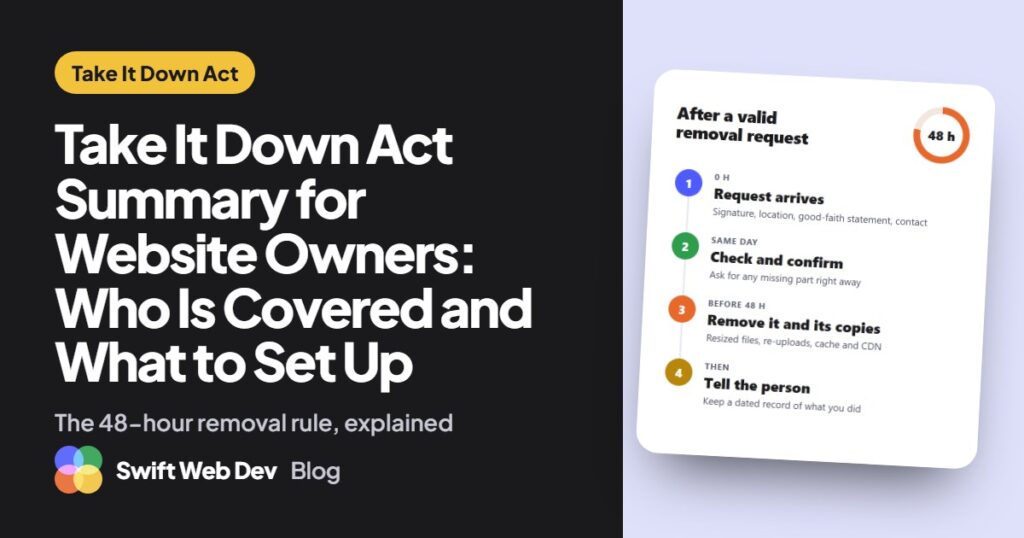
- The request: written, with four parts: a signature, where the image is, a good-faith statement and contact details.
- The deadline: remove it within 48 hours of a valid request, along with known identical copies on your site.
- Enforcement: the FTC, since May 19, 2026, with civil penalties the FTC puts at $53,088 per violation.
Does the Take It Down Act apply to your website?
The law applies to a “covered platform”: a website, online service or app that serves the public and primarily provides a forum for user-generated content, such as messages, videos, images and audio. It also applies to services whose regular business is hosting or publishing intimate content.
Three kinds of service are left out: broadband providers, email, and sites made mostly of content the owner picks, where user chat or comments are only incidental. That last exclusion is the one most WordPress sites care about. Nothing in the definition depends on traffic or company size. It turns on what the site is for.
Here’s how that plays out for common WordPress sites. Treat it as a starting point, not a ruling. For a read on your own site, the free Take It Down Act checker walks through the same test in four questions.
| Type of site | Likely covered? | Why |
|---|---|---|
| Forum (bbPress, wpForo) | Yes | Members’ posts are the point of the site |
| Membership community (BuddyPress, BuddyBoss, PeepSo) | Yes | Profiles, photos and activity come from users |
| Site built around user uploads (galleries, classifieds, dating) | Yes | User photos and videos are the main content |
| Marketplace with vendor listings | A closer call | Vendors write much of the content; ask a lawyer |
| Business blog with comments | Usually not | You write the posts; comments sit beside them |
| WooCommerce store with product reviews | Usually not | Your products are the content; reviews are incidental |
Even if your site falls outside the definition, a simple way to ask for removal costs little and helps the person in the photo. Many of the steps below are worth doing anyway.
What the law requires from covered sites
The duties fit in four lines. The statute sets the rules; the FTC’s business guidance adds how it expects sites to apply them.
- Publish a clear notice. The law asks for a “clear and conspicuous notice” that is easy to read and in plain language, explaining your duties and how to send a request. A clear link to a separate page is fine. The FTC suggests linking it from your home page and wherever user images appear.
- Accept requests. The FTC says the process shouldn’t be limited to people who hold an account, and suggests letting people ask for removal right from the photo or video.
- Remove within 48 hours. The law says “as soon as possible, but not later than 48 hours” after a valid request.
- Remove known copies. You must make reasonable efforts to find and remove known identical copies. The FTC adds that the person doesn’t have to report each duplicate.
The FTC also suggests giving each request an ID number, telling the person whether you removed the content and why if you didn’t, and hashing removed files so the same file can’t be uploaded again.
The four parts of a valid removal request
A request has to be in writing and include:
- A physical or electronic signature of the person, or of someone allowed to act for them.
- Something that identifies the image, and enough information to find it on your site, such as a link.
- A short statement that they believe in good faith the image was shared without consent.
- Contact information for the person or their representative.
Notice what isn’t on the list. The person doesn’t have to send you the image again, and your form shouldn’t ask for it. An ID document isn’t one of the four parts either.
The 48-hour rule in practice
The clock runs from when your site receives a valid request, not from when someone on your team gets around to reading it. Weekends count. That’s the part that catches small teams out, because a request that lands on a Friday evening is due on Sunday evening.
A few habits keep the deadline safe: send request alerts to more than one person, check the inbox every day, and set a reminder well before the 48 hours run out. If a request is missing one of the four parts, reply the same day and ask for it. Don’t let an incomplete request sit.
Where copies hide on a WordPress site
Removing “the post” is often not enough on WordPress. These are the places I’d check before calling an image gone:
- The media library. Deleting or unpublishing a post doesn’t delete the images in it. The files stay in the uploads folder and still load for anyone with the address.
- Resized copies. WordPress saves several smaller sizes of every image you upload. In my WebP test, one JPEG upload produced eight extra files, and each one has its own address.
- Re-uploads. The same photo uploaded twice becomes a second file with a new name, such as photo-1.jpg. Matching by file name misses it; matching by the file’s fingerprint (a hash) finds it.
- Caches and CDNs. A page cache plugin, Cloudflare or Jetpack’s image CDN can keep serving a copy until you purge it.
- Community plugins. Profile photos, cover images and message attachments often live outside the normal media library, and some plugins keep them outside the uploads folder entirely.
When you think you’re done, open the old image addresses in a private browser window. If any of them still loads, it isn’t removed yet.
How the FTC enforces the Take It Down Act
Under the law, a site that fails to “reasonably comply” with these duties is treated as breaking an FTC rule on unfair or deceptive practices. The FTC states the civil penalty as $53,088 per violation.
The FTC began enforcing on May 19, 2026. It opened a complaint portal at TakeItDown.ftc.gov, where anyone can report a site that ignored a valid request or never set up a process. Its chairman also sent reminder letters to 15 companies, including Alphabet, Meta, Reddit, Discord and Automattic, the company behind WordPress.com. As of mid-November 2026 I couldn’t find a public enforcement case against a website, but the portal is open to anyone.
The law also protects sites that act in good faith. A site isn’t liable for claims based on disabling or removing material in good faith, even if the material later turns out to be lawful.
A setup checklist that works on any site
- Write the notice page in plain words: what you remove, the 48-hour promise, the four things a request needs and how to send it.
- Link it from your footer and from the pages where users post.
- Give people a way to send a request without an account, such as a form or an email address.
- Collect the four parts, and nothing that isn’t needed. Don’t ask for the image.
- Send alerts to at least two people and check the inbox daily.
- Give every request an ID and note when it arrived.
- Remove the item and every copy you can find, then check the old addresses while logged out.
- Tell the person what you did, or why you didn’t remove it.
- Keep a dated record of each request and what happened.
- Point people to StopNCII (adults) or NCMEC’s Take It Down (minors), which help keep the same image off other platforms.
Setting it up on a WordPress site
You can cover most of this with a page, a contact form and a shared inbox. The hard parts are the clock and the copies: knowing which requests are close to 48 hours, and finding every resized and re-uploaded file.
That’s why I built Takedown Desk, a free WordPress plugin for this process. It adds the notice page and a request form that needs no account, puts a 48-hour clock on every request, finds identical copies in the media library and removes them along with the post, and keeps a dated record you can export. It’s waiting for review on WordPress.org right now, and I’ll link it here when it’s live. No plugin makes a site meet the law on its own, though. The process still depends on someone acting on each request.
Take It Down Act or DMCA takedown notice?
They’re different laws. A DMCA takedown notice is about copyright and comes from whoever owns the work, and the law gives the uploader a way to push back with a counter-notice. A Take It Down Act request is about consent and comes from the person in the image or someone acting for them, with a 48-hour deadline and no counter-notice step. If your site already handles DMCA notices, don’t assume that process covers this one.
Questions people ask about the Take It Down Act
When did the Take It Down Act take effect?
It was signed on May 19, 2025. Websites had one year to set up their removal process, so the platform rules have applied since May 19, 2026, the same day the FTC started enforcing them.
Does the Take It Down Act apply to small websites?
The definition doesn’t depend on size or traffic. A small forum or community site that mainly hosts member posts fits it the same way a large one does. The Take It Down Act checker gives you a quick first read.
Do I have to search the whole internet for copies?
No. The duty is about known identical copies on your own platform. To help keep an image off other sites, point the person to StopNCII or NCMEC’s Take It Down.
Can someone without an account send a removal request?
Yes. The FTC says the process shouldn’t be limited to account holders, so a form or email address that anyone can use is the safe choice.
What if the image shows someone under 18?
Then it may also be child sexual abuse material, which has its own reporting rules. Report it to NCMEC’s CyberTipline and get legal advice right away.
Is this legal advice?
No. It’s a plain-English summary of the law and the FTC’s guidance as of November 2026. For a decision about your own site, talk to a lawyer.
Sources
- 47 U.S.C. § 223a, the platform section of the law (Cornell Legal Information Institute)
- Complying with the Take It Down Act (FTC business guidance)
- FTC begins enforcing the Take It Down Act (FTC press release, May 19, 2026)