
SourceSayFree WooCommerce plugin by Swift Web Dev
Ask customers how they found you and see which channels bring revenue
SourceSay adds one question to the WooCommerce thank-you page: How did you hear about us? Every answer is saved with the order total, so you see revenue per channel, including the podcasts, word of mouth and creators that analytics never sees.
Listed on WordPress.org. You can also install it from Plugins, Add New Plugin in your WordPress admin: search for SourceSay.
Analytics sees the click. Customers know the reason.
Analytics tools can only track clicks. They miss podcasts, word of mouth, influencers and the share of traffic that shows up as direct. SourceSay asks the one question that fills the gap.
What analytics records
- DirectNo referrer, no story
- UnknownNothing was tracked
- GoogleBut who sent them there?
What customers tell SourceSay
- Podcast: the one they named in the follow-up
- Friend or family
- Influencer or creator
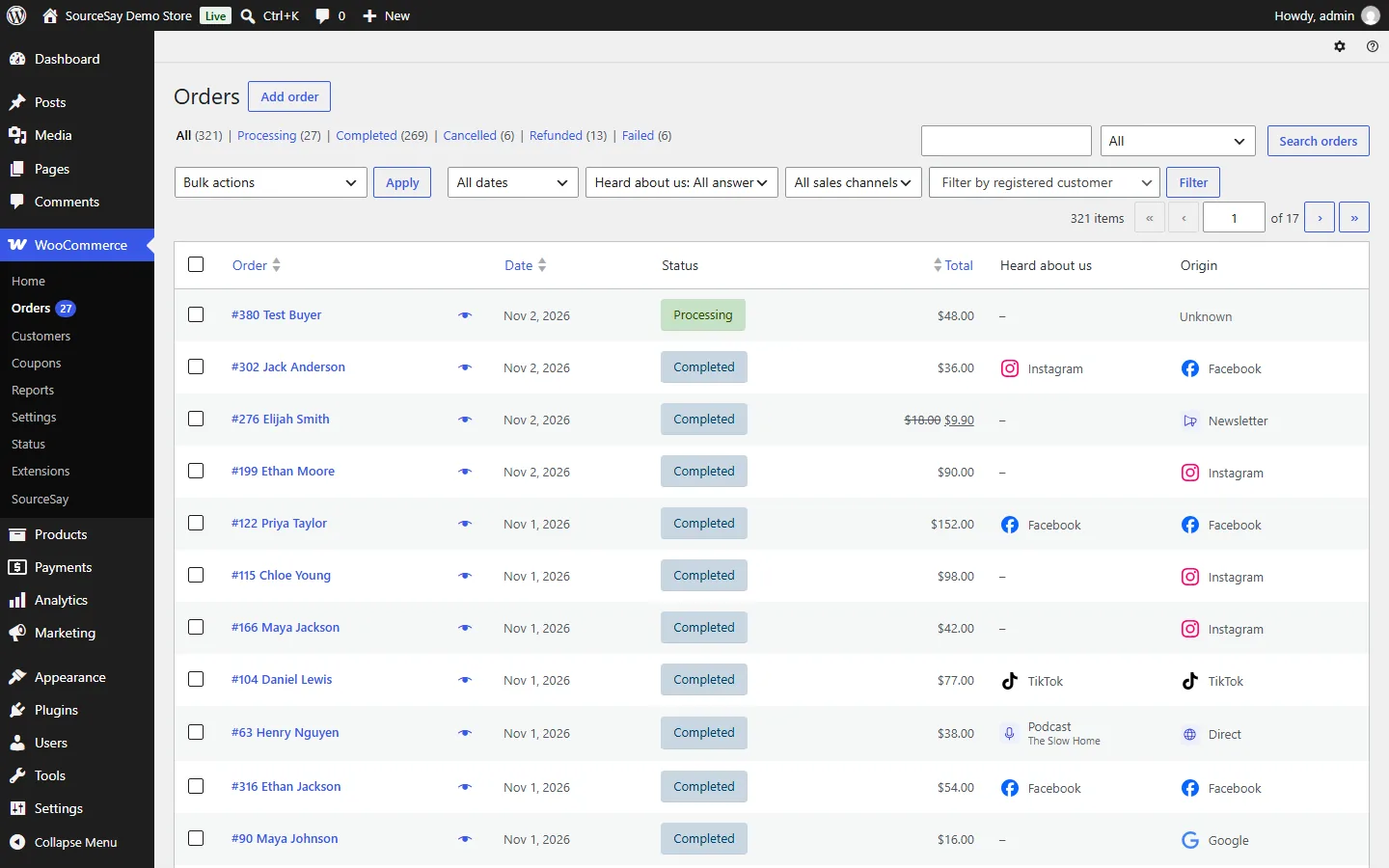
SourceSay keeps both views. Each order shows what the customer said next to the source WooCommerce Order Attribution tracked, and the report compares the two.
How it works
Built for store owners, not analysts. A short guided setup gets the survey ready without reading any docs.
- 1
Install and check your question
Pick your kind of store (general, fashion and beauty, B2B and services, or local) to fill in the answers, reword the question if you like, and place a test order to see it live. The survey stays off until you turn it on.
- 2
Customers answer in one tap
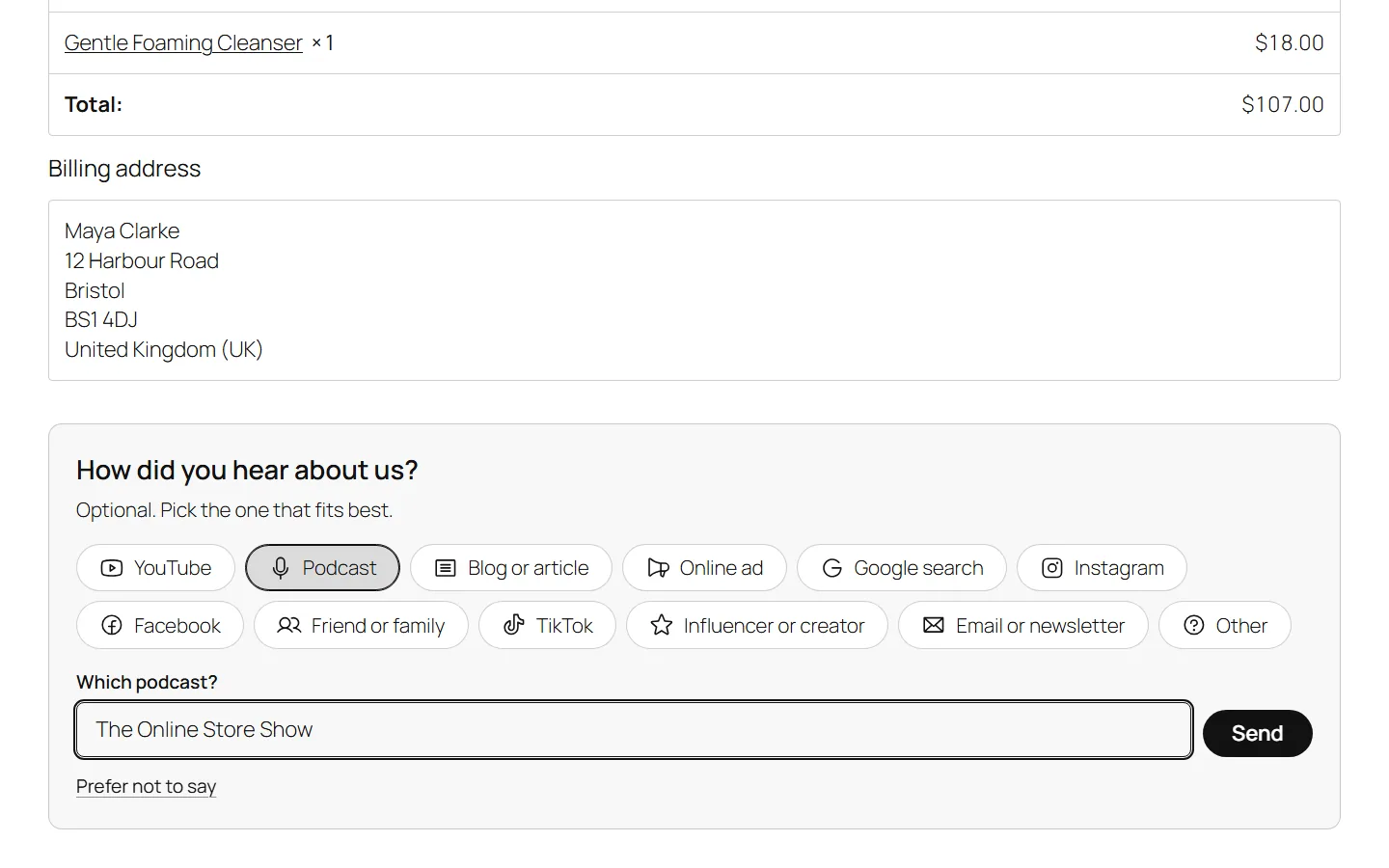
The question appears on the order confirmation page right after checkout. Answers can ask a follow-up such as "Which podcast?", and a "Prefer not to say" button lets customers skip.
- 3
See revenue per channel
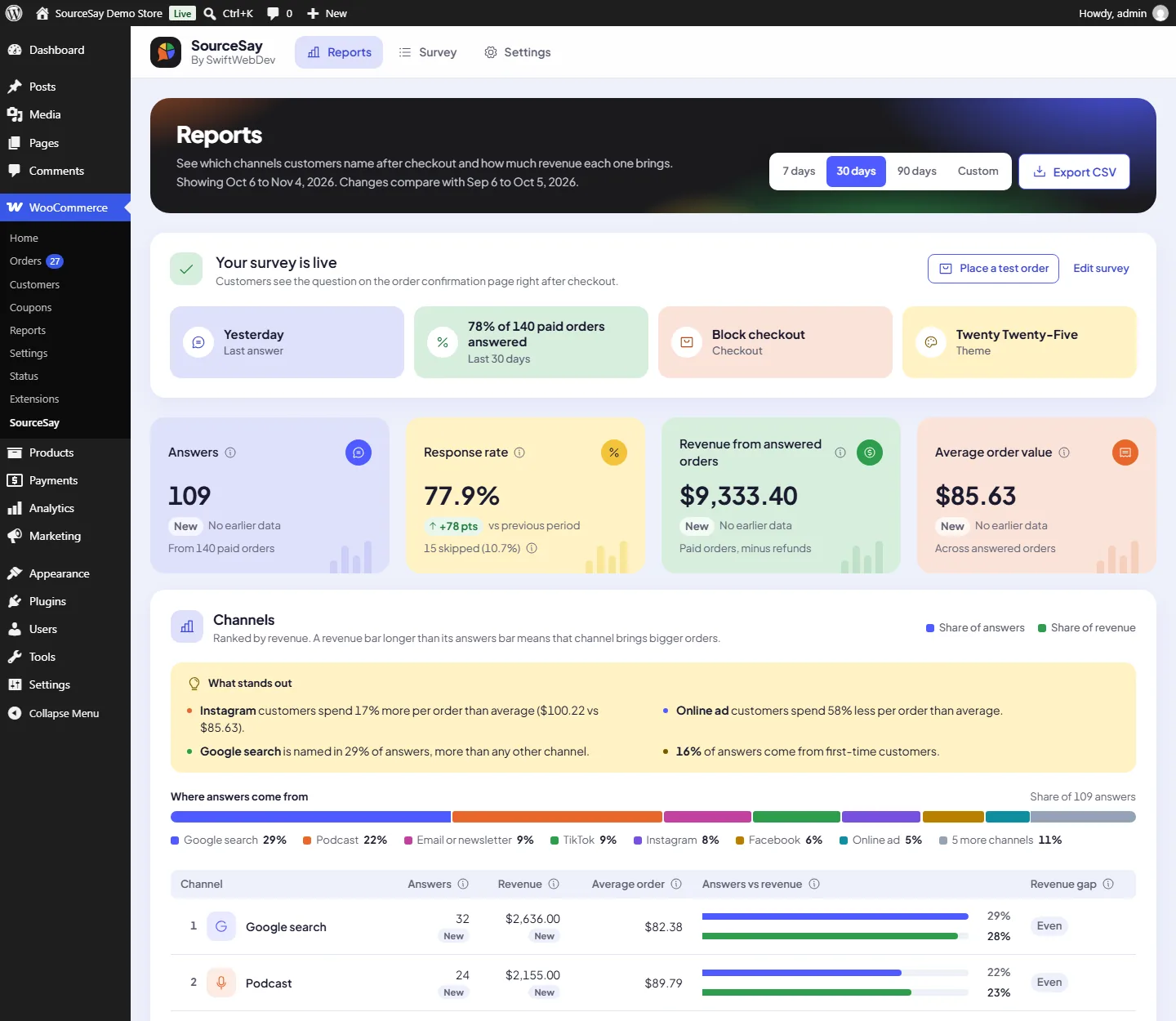
Open WooCommerce, SourceSay, Reports: answers, response rate, revenue and average order value for every channel, compared with the previous period and explained in plain words.
Real screens from the plugin
Taken on a demo WooCommerce store. Select a screen to open it full size.
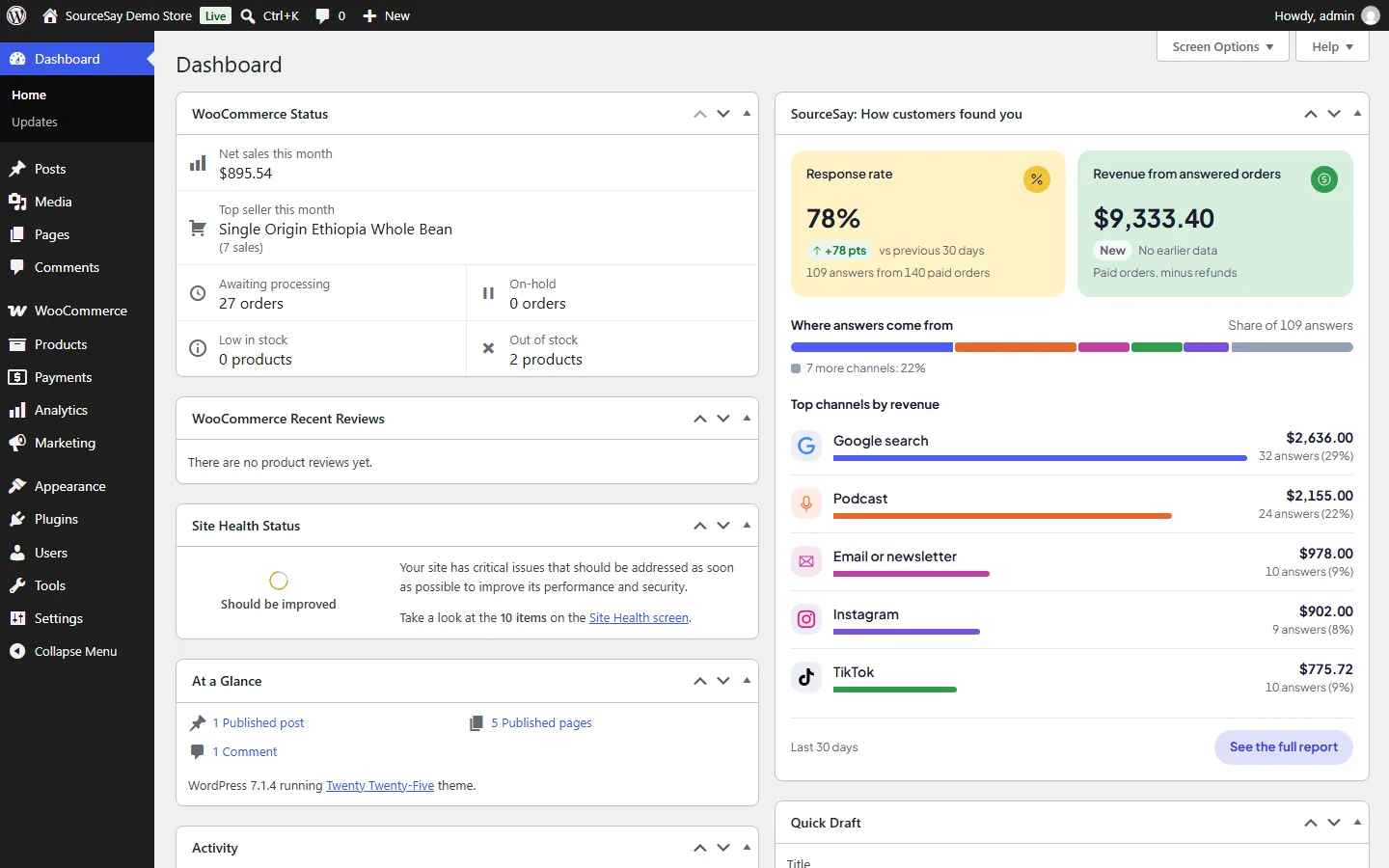
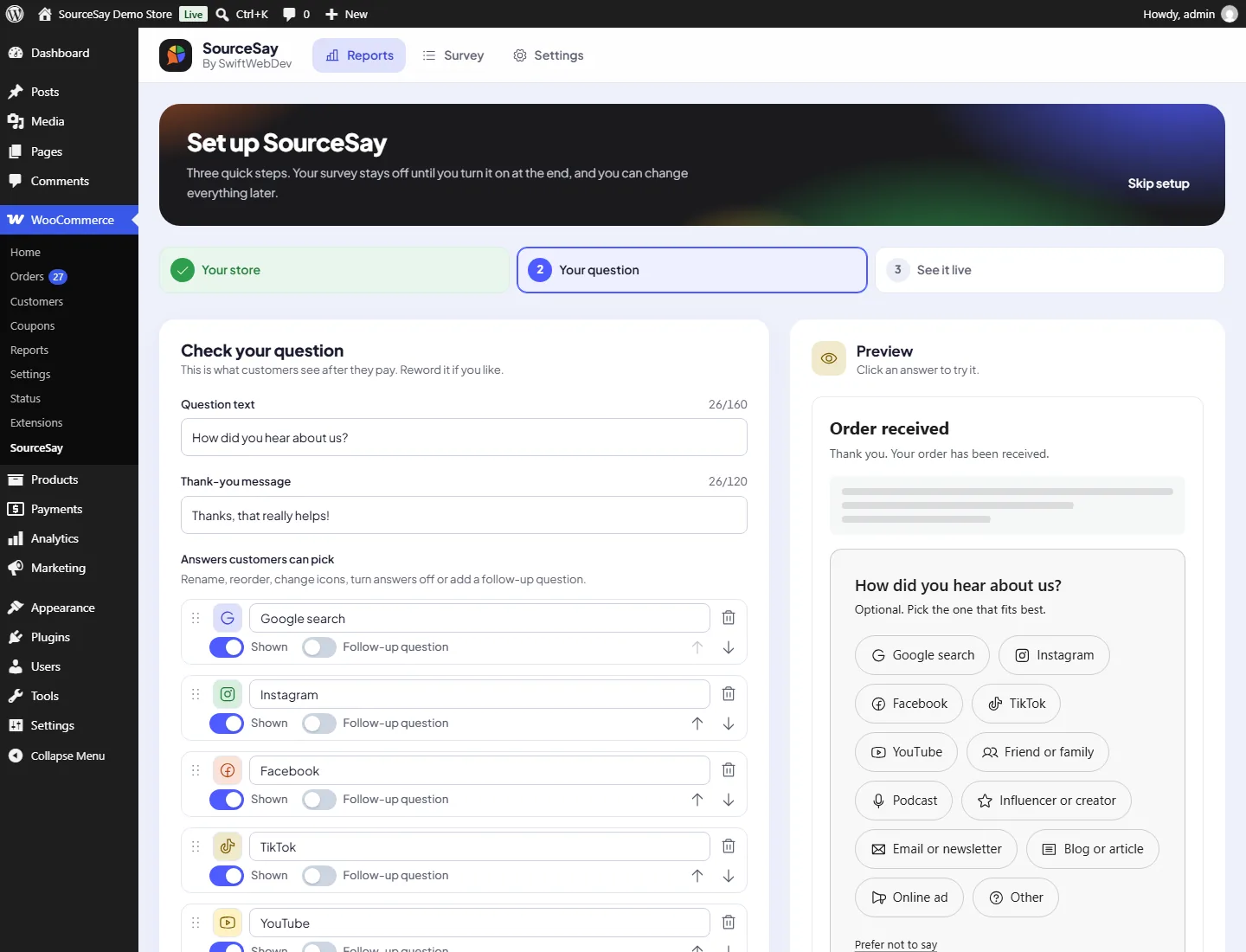
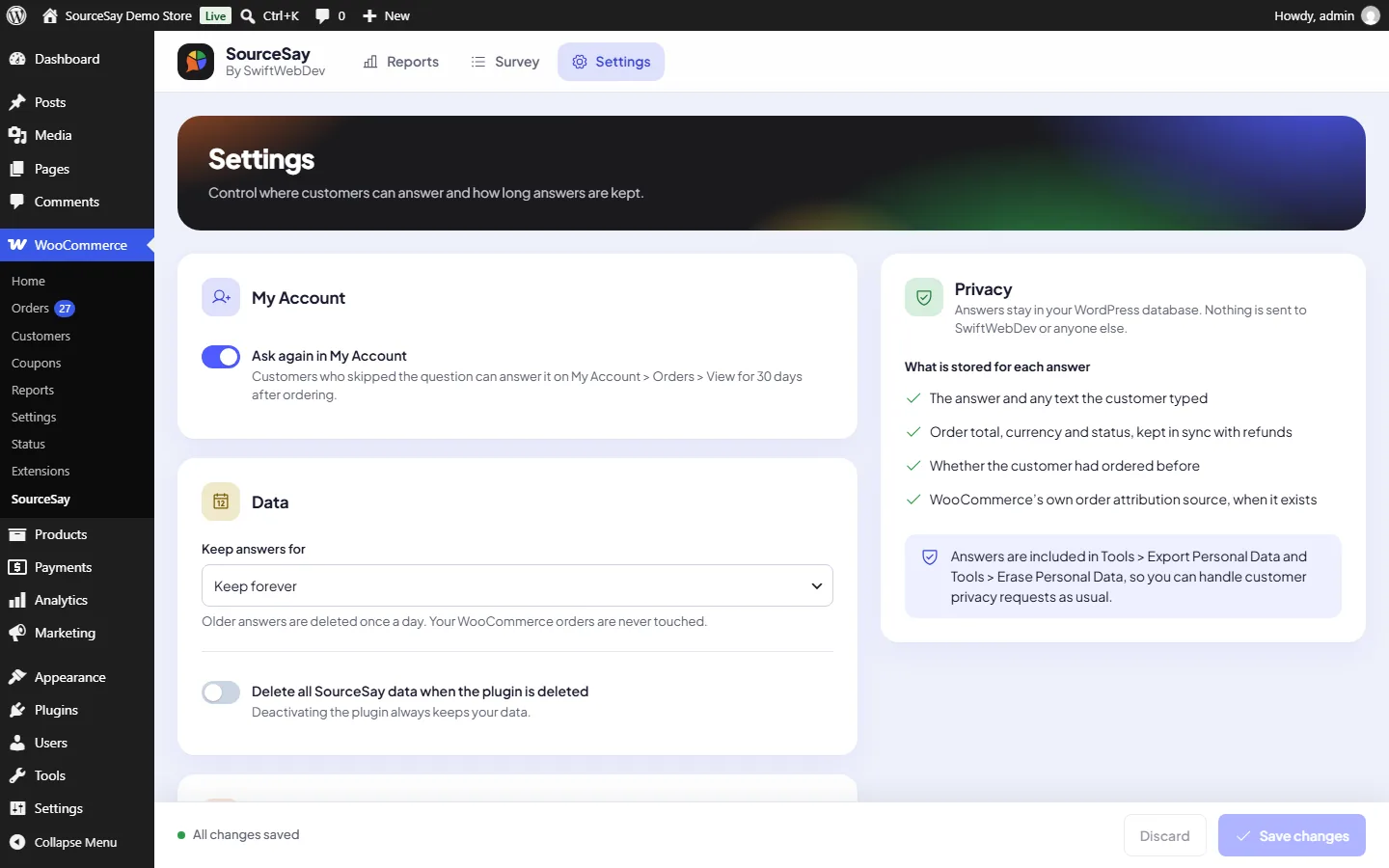
Everything in the free plugin
Unlimited responses, no account and no usage limits. A Pro add-on is planned.
On the thank-you page
- One-tap survey that works with classic checkout and the Checkout block.
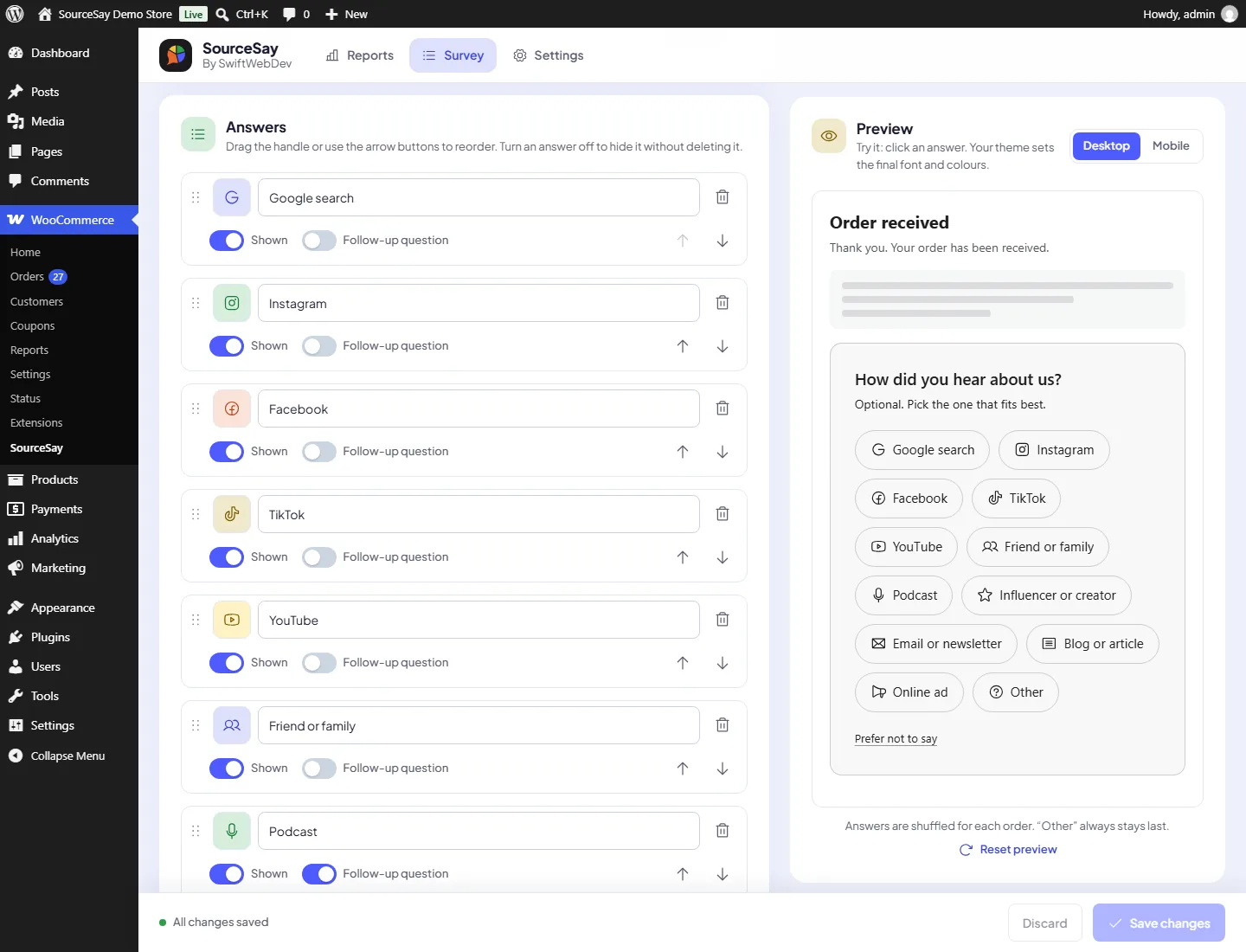
- Editable question, answers, icons, order and follow-up questions.
- Starter answer sets for general stores, fashion, B2B and local businesses.
- “Prefer not to say” button. Skips are counted but never mixed into answers or revenue.
- New customers only: skip people who ordered before.
- Shortcode
[sourcesay]and a “SourceSay survey” block for FunnelKit, CartFlows, Elementor and Bricks thank-you pages. - Works without JavaScript, with a honeypot and rate limiting.
In your reports
- Responses, response rate, revenue and average order value per channel.
- Daily trend, new versus returning customers, top follow-up answers and the latest “Other” answers.
- Comparison with the previous period of the same length.
- What customers said next to what WooCommerce Order Attribution tracked.
- Revenue stays live: refunds and status changes update the stored order total.
- CSV export, safe against spreadsheet formula injection.
Inside WooCommerce
- Orders list column and filter, plus a box on the order screen.
- Private order note, for example “Customer said: Instagram”.
- Orders search by answer.
- A “How they found you” section on customer profiles.
- Dashboard widget with your top five channels from the last 30 days.
Ready for any store
- HPOS (high-performance order storage) compatible.
- Multi-currency stores: revenue is reported in your store currency, using Aelia, WooPayments Multi-Currency, CURCY and WPML/WooCommerce Multilingual rates when present.
- WPML and Polylang: the question, answers, follow-ups and thank-you text can be translated.
- Personal data exporter and eraser, plus optional automatic data retention.
Answers stay in your own database
No data is sent to external servers. No external scripts, fonts or images are loaded, and there is no tracking.
What is stored for each answer
- The answer
- Optional follow-up and "Other" text
- Order total, currency and status
- Whether the customer ordered before
- The source WooCommerce tracked
Tools you control
- Works with the WordPress personal data export and erase tools. Erasing blanks the free text and unlinks the customer account.
- Optional automatic retention period in Settings.
- Uninstalling deletes nothing unless you turn on "Delete all data on uninstall".
Questions store owners ask
Short answers here. The docs cover every setting step by step.
Read the SourceSay docs
Where does the survey appear?
On the order confirmation page, before or after the order details. It can also appear on My Account, View order for 30 days if the customer has not answered yet.
Does it slow down my checkout?
No. The survey is shown after the order is placed, and its small script and stylesheet load only on the order confirmation and view-order pages.
My store uses FunnelKit or CartFlows. How do I show the survey?
Those plugins replace the WooCommerce thank-you page, so add the “SourceSay survey” block or the [sourcesay] shortcode to your funnel’s thank-you step. SourceSay reads the order from the page address, and the order key must match. Set Placement to “Only where I add the SourceSay block or shortcode” on the Survey tab if you do not want the automatic placement as well. The survey is shown only once per page.
Can customers skip the question?
Yes, by default. A “Prefer not to say” button saves a skip so the survey is not shown again. Skips appear as a separate number in the report and never count as answers. Turn it off, or change the button text, on the Survey tab.
Can I ask only new customers?
Yes. Choose “Only first-time customers” under Who to ask. Customers who already had a paid order are not asked. Test orders always show the survey.
Do I see the answer in order emails?
Yes, in emails sent to you after the customer answered, and always as a private note on the order. The “New order” email is sent before the customer reaches the thank-you page, so it cannot contain the answer.
Does it work with multi-currency or translation plugins?
Yes. Orders paid in another currency are converted to your store currency using the rate saved by Aelia, WooPayments Multi-Currency, CURCY or WPML when it exists. With WPML or Polylang, translate the SourceSay texts under String Translation (WPML) or Languages, Translations (Polylang), group “SourceSay”.
Can customers answer twice?
No. Each order has at most one answer.
Does it work with the Checkout block?
Yes. It uses the standard order confirmation hook, which both classic and block checkout fire.
How do I export the data?
Use the Export CSV button on the Reports tab.
What happens when I uninstall?
Nothing is deleted unless you turn on “Delete all data on uninstall” in Settings.
Hear it from your customers
SourceSay is free on WordPress.org and takes a minute to install. Need more questions, deeper reports or ad-platform sync? See SourceSay Pro. Questions about your store setup? I am Rasel Hakkani, the WordPress developer who built it. Ask me directly.
Listed on WordPress.org. You can also install it from Plugins, Add New Plugin in your WordPress admin: search for SourceSay.